

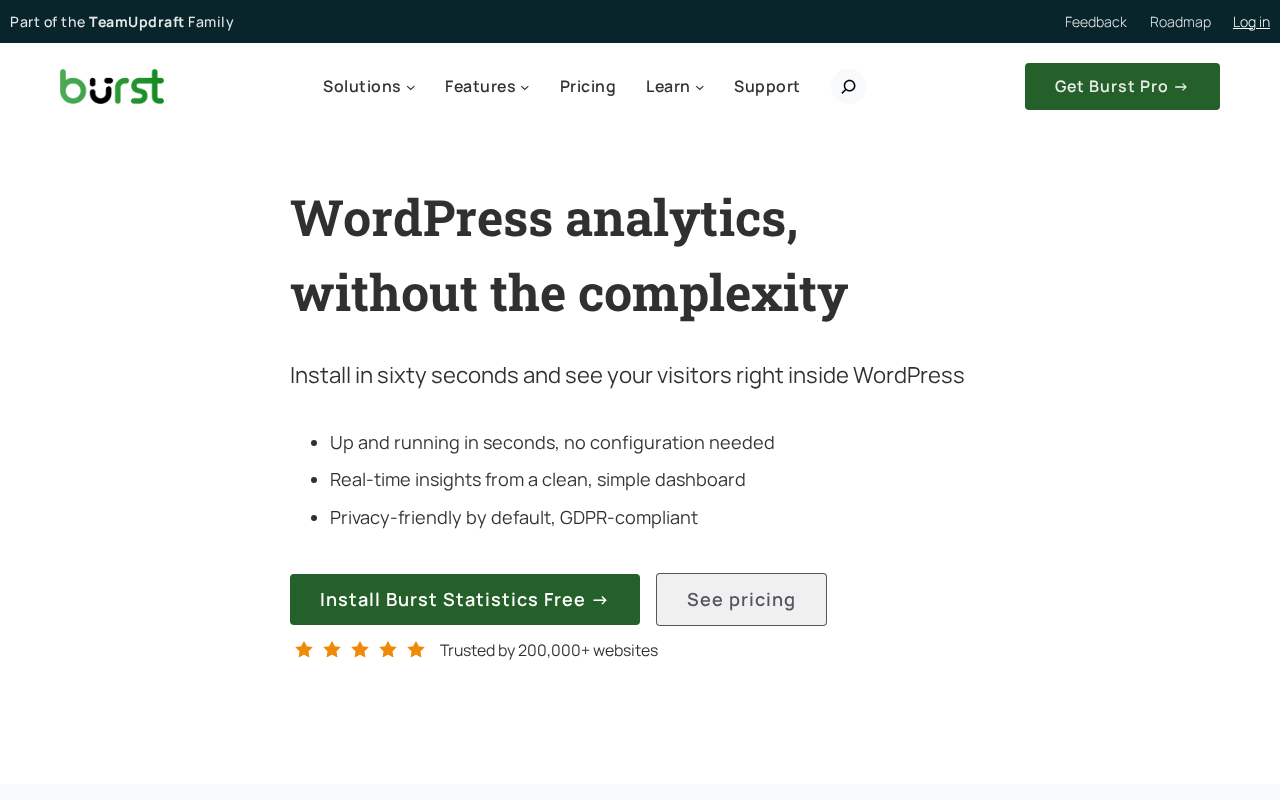
Two hundred thousand WordPress sites. That is the number Burst Statistics has reached in its short existence, and the number that earns it a closer look. In a category dominated on one side by Google Analytics connectors like MonsterInsights and ExactMetrics, and on the other by a long-standing incumbent in WP Statistics, Burst Statistics has carved out an install base of that size by competing on a single idea: simplicity without sacrifice.
Burst Statistics is a privacy-first, self-hosted WordPress analytics plugin built by Burst Statistics B.V., part of Team Updraft, the developers behind UpdraftPlus, WP-Optimize, and All-In-One Security. The plugin stores all visitor data locally on your WordPress database, supports cookieless tracking, and requires no Google account, no external API setup, and no consent banner configuration. The pitch is that you can install it and start reading meaningful data within sixty seconds.
This review covers version 3.6.3, last updated August 19, 2026, and tested up to WordPress 7.1. I worked through the official Burst Statistics website at burst-statistics.com, the pricing page, feature and comparison pages, the WordPress.org plugin listing (version 3.6.3, 200,000+ active installs, 4.9/5 stars across 182 reviews), the plugin changelog, and the WordPress.org FAQ. Where a paid Pro feature was not directly accessible, the relevant section says so clearly.
At a glance
Audited on: burst-statistics.com features, pricing, and comparison pages; the WordPress.org plugin listing (version 3.6.3, last updated August 19, 2026, tested up to WordPress 7.1); the plugin changelog and FAQ. Pricing checked against burst-statistics.com/pricing/ on August 20, 2026.
Free tier: visitor and pageview tracking with no limits, real-time active user count, top-performing pages, device breakdown (desktop/tablet/mobile), bounce rate, referrer analysis, up to 3 custom goals, 404 error tracking, email reports (weekly/monthly), Search Console integration, basic engagement tracking.
Paid tiers: Creator at $49/year for 1 site; Business at $99/year for 1 site; Agency at $199/year for unlimited sites. Multi-site plans: Creator 5-site at $79/year, Business 5-site at $119/year, Agency unlimited also at $199/year. All Pro plans include a 14-day free trial and a 30-day money-back guarantee (44 total risk-free days).
Bottom line: the best-designed entry point in the self-hosted, privacy-first WordPress analytics category for site owners who want clean data without Google Analytics. The free version is genuinely capable with unlimited pageviews and real goal tracking. Paid plans add geographic insights, UTM tracking, and WooCommerce revenue reporting at competitive prices.

Quick verdict
Burst Statistics earns its 4.9-star rating by doing something most analytics plugins struggle with: looking obviously useful from the first minute after activation. There is no OAuth flow to complete, no measurement ID to copy-paste, no tag manager to configure. You install the plugin, activate it, and the dashboard starts populating with your real visitor data immediately.
The free version is not a trial. It covers unlimited pageviews and visitors, three custom goals, real-time analytics, basic referrer analysis, device breakdown, 404 tracking, and email reports. For a personal blog, small business site, or any WordPress project where the primary questions are “how many people visited today” and “which pages are they reading,” Burst Statistics free answers both without asking anything back.
The paid Pro plans are priced fairly for what they include. Creator at $49/year unlocks geographic data by country and city and UTM campaign tracking. Business at $99/year adds the WooCommerce revenue dashboard with sales funnel visualization. Agency at $199/year adds automated client reporting for unlimited sites. These prices sit below comparable paid tiers from WP Statistics and Matomo for WordPress, and far below anything in the Google Analytics connector category.
The honest limitation is what Burst Statistics is not designed to do. It does not connect to Google Analytics. It does not provide an AI analytics layer, cross-device identity tracking, Google Ads conversion import, or the kind of cross-property data aggregation that enterprise analytics requires. Burst Statistics competes on clarity and compliance, not feature maximalism. For most WordPress site owners, that is exactly the right trade-off.
Quick verdict
Best for: WordPress bloggers, small business site owners, agencies managing client sites in regulated markets (EU/EEA), WooCommerce store operators who want privacy-compliant sales analytics, and any site owner who wants meaningful traffic data without a Google account.
Best plan for single sites: Business at $99/year covers one site with the complete Pro feature set including WooCommerce revenue tracking, UTM campaign analytics, and geographic data. For sites without WooCommerce, Creator at $49/year delivers the marketing data (UTM, geographic) at a lower annual cost.
Best plan for agencies: Agency at $199/year covers unlimited sites with automated client reporting. No competitor matches this structure at this price in the privacy-first analytics category.
Standout: genuinely cookieless tracking option with no consent banner needed; 100% self-hosted data with no third-party access; tracking script under 4 KB; unlimited pageviews at zero cost; 4.9/5 star rating from 182 reviews; built by Team Updraft, the developers behind UpdraftPlus.
Watch out for: geographic data is not included in the free tier; UTM campaign tracking requires Creator or above; WooCommerce funnel and revenue tracking is Business-only; goal tracking is limited to 3 goals in the free version; cookieless tracking has a small accuracy trade-off acknowledged by the developer; no GA4 integration for those who need both a privacy layer and Google data.
What Burst Statistics is
Burst Statistics is a WordPress-native analytics plugin that records visitor data directly into your WordPress database. No data leaves your server. No Google account is needed. No cookie consent banner is triggered by the plugin itself.
The plugin was created by Burst Statistics B.V., a company operating under Team Updraft, the same developer group responsible for UpdraftPlus (the most-installed WordPress backup plugin, with millions of active installs), WP-Optimize, and All-In-One Security (AIOS). The Team Updraft connection matters because it signals continuity: Burst Statistics is not a side project. It is backed by a development team with a long and active track record in the WordPress plugin ecosystem.
The design philosophy is clearly stated in the WordPress.org plugin description: “Google Analytics is overkill. Most other WordPress statistics plugins are cluttered and confusing. You just want to track visitors and know what is happening on your site, without a data science degree.” That framing positions Burst Statistics explicitly against two categories: the complexity of Google Analytics-connected plugins, and the cluttered interfaces of older self-hosted analytics tools.
In 2026, Burst Statistics reached version 3.6.3 with notable additions: tracking health monitoring that alerts administrators if analytics collection is disrupted, community benchmarks that compare your site’s metrics against anonymized averages from other Burst users, and enhanced security hardening. The plugin requires WordPress 6.6 or higher and PHP 8.0 or higher.
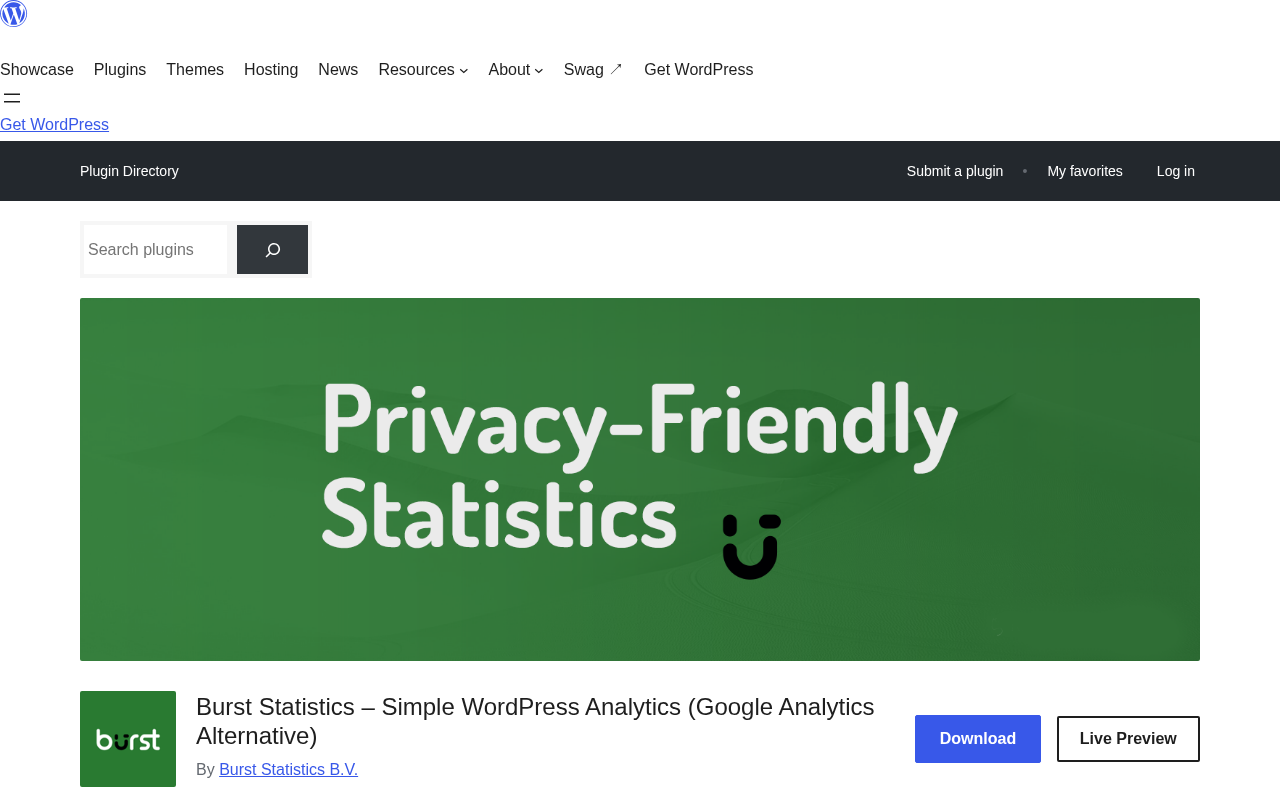
The free version on WordPress.org shows 200,000+ active installs and a 4.9-star rating across 182 reviews (171 five-star reviews) as of August 2026. Within the self-hosted analytics category, this satisfaction score is exceptional. WP Statistics, its nearest direct competitor with 600,000+ installs, carries a 4.1-star rating across 757 reviews. Burst Statistics has fewer installs but measurably higher user satisfaction.
Who Burst Statistics is best for
Strong fit:
- WordPress bloggers and content publishers who want to see traffic numbers (sessions, pageviews, top pages, referrers) directly in the WordPress admin without signing up for a Google account or configuring an external analytics property.
- Site owners operating in GDPR-regulated markets (EU, EEA) or privacy-sensitive industries where data transfer to Google’s US-based infrastructure creates legal or compliance complexity. Burst keeps all data on your own server.
- Sites with a significant proportion of privacy-conscious visitors who block third-party trackers, use tracking-protection browsers (Firefox Enhanced Protection, Safari ITP), or decline cookie consent. These visitors are typically missed by Google Analytics-connected plugins. Burst Statistics counts them.
- WooCommerce store operators who need sales analytics (revenue, conversion funnel, average order value) without the GA4 eCommerce implementation overhead. Burst Pro Business at $99/year covers this without requiring Google Tag Manager, custom event code, or a GA4 account.
- Digital agencies managing multiple client sites who need privacy-compliant analytics reporting for clients with strict data governance requirements. Burst Pro Agency at $199/year covers unlimited sites with automated client-ready reports.
- Content teams and freelancers who need a simple analytics dashboard they can explain to non-technical clients. Multiple Burst user reviews specifically note that clients can understand the data without training.
- Developers who want Composer-compatible installation and clean database queries without plugin overhead.
Weak fit:
- Sites that need Google Analytics 4 data inside WordPress. Burst Statistics is not a GA4 connector. If your team uses GA4 as the primary reporting layer, MonsterInsights or Analytify serve that need. Burst and GA4 can run simultaneously, but Burst does not surface GA4 data.
- Enterprises requiring AI-powered analytics queries, cross-device identity graphs, or deep integration with Google Ads conversion tracking. Burst is intentionally simpler and does not attempt to replicate the full GA4 feature set.
- Sites that need a comprehensive full replacement for Google Analytics with heatmaps, session recordings, form analytics, A/B testing, and multi-channel attribution. Burst addresses core metrics; Matomo addresses the enterprise analytics stack.
- Sites that need more than 3 custom goals tracked at zero cost. Burst’s free tier caps goals at 3; WP Statistics offers unlimited goals in its free tier.
- Organizations that need geographic analytics (country and city data) in the free plan. Geographic data is available from the Creator plan at $49/year and above. WP Statistics includes geographic data in its free version.
Setting up Burst Statistics
Installation follows the standard WordPress plugin pattern. From the WordPress admin, navigate to Plugins, Add New, search for “Burst Statistics,” and install. Activation is one click. The plugin claims a sixty-second time-to-data, and that is accurate: immediately after activation, the Burst dashboard begins recording and displaying incoming traffic.
There is no external account to create. There is no API key to obtain. There is no tracking code to copy. Burst injects its own tracking script (under 4 KB) into the WordPress frontend automatically on activation. The script is served locally, not from a third-party CDN.
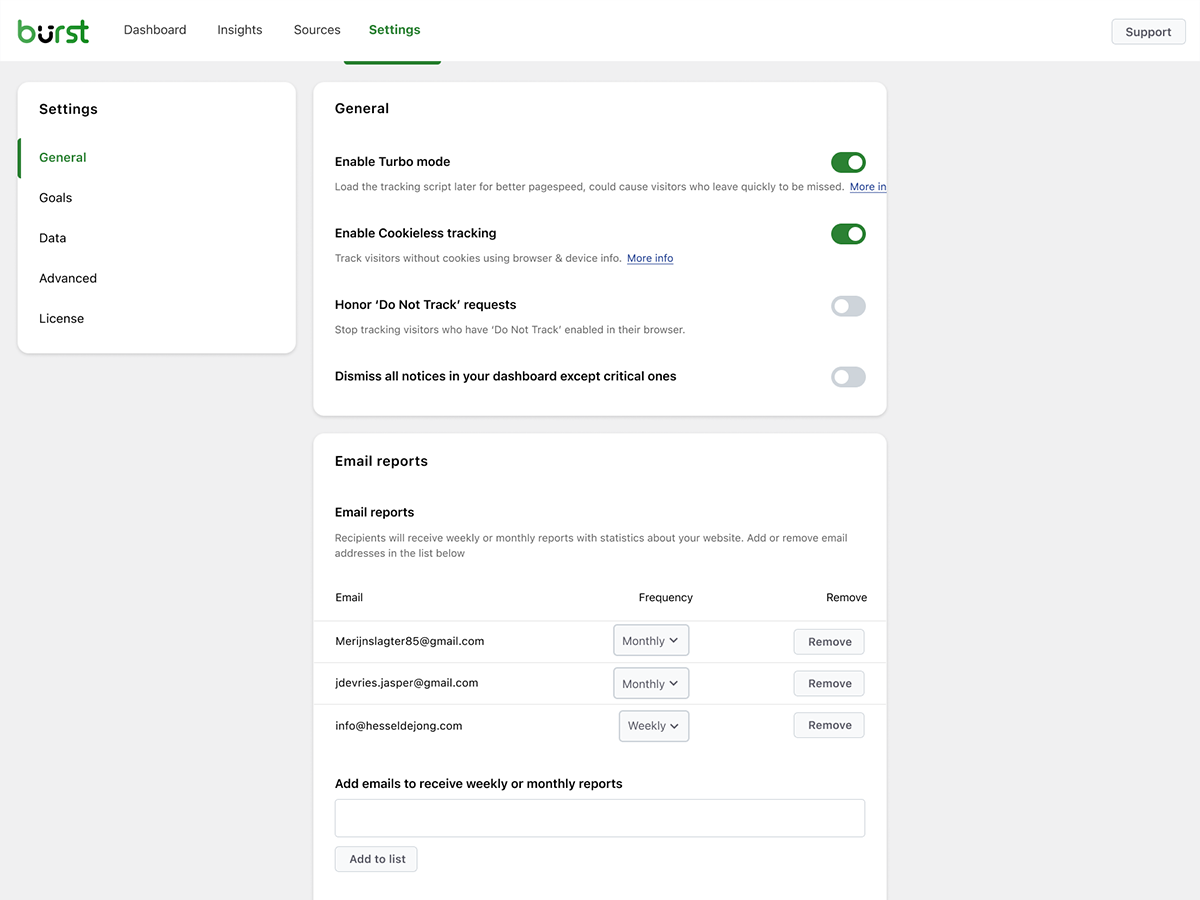
The Burst settings panel is accessible from the WordPress admin sidebar under “Burst.” The settings cover: cookie mode versus cookieless mode toggle; data retention configuration; tracking exclusions for logged-in users, administrators, and specific user roles; an anonymous usage sharing toggle for community benchmarks (opt-in, disabled by default); and Google Search Console connection (optional, for adding keyword data alongside Burst’s traffic data). The settings panel is brief and readable with no multi-step configuration wizard required. First-time users can be operational in under two minutes.
Dashboard and main reports
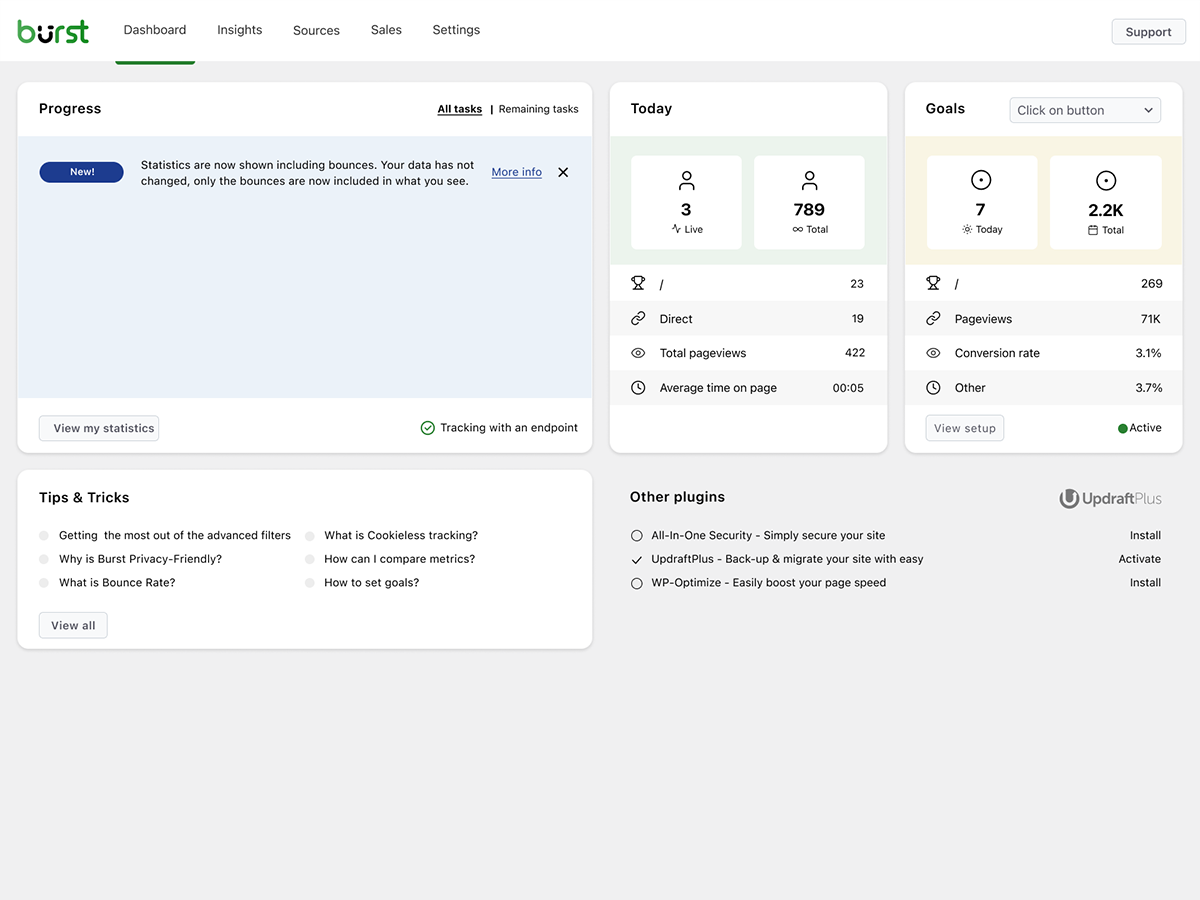
The Burst Statistics dashboard is accessible from the WordPress admin under Burst. The main overview screen presents a clean, metric-forward layout with visitor and session counts over the selected date range, total pageviews with period-over-period comparison, bounce rate and average session duration, returning versus new visitor split, device breakdown (desktop, tablet, mobile), top pages by session count, traffic sources and referrers ranked by volume, and a live visitor count showing real-time active users.
The date range selector supports preset periods (today, yesterday, 7 days, 30 days, 3 months, 12 months) and a custom range. Comparison mode lets you set two date ranges side by side to compare growth or decline. The interface is deliberately light: charts are clear area and bar graphs with legible labels, and there is no dense data table requiring horizontal scrolling. The four most-used numbers (visitors, pageviews, bounce rate, session duration) appear prominently at the top without requiring a navigation click.
Real-time analytics
Real-time visitor data is available in the Burst dashboard as a live count of currently active users. The counter shows visitors on the site at the current moment and updates without a page refresh.
Version 3.6.3 introduced a tracking health monitoring feature that actively checks whether the Burst tracking script is firing correctly and alerts the WordPress administrator if anything disrupts data collection: a broken script, a caching issue, or a plugin conflict. For site owners who depend on analytics being accurate, this is a practical quality-of-life addition that other self-hosted analytics plugins do not currently offer.
The same release added community benchmarks: opt-in, anonymized comparisons that show how your site’s key metrics (bounce rate, session duration, pages per session) compare to other Burst-powered sites in the same category. This partially addresses a longstanding limitation of self-hosted analytics: the absence of an external reference point for “is this normal?”
Goal and conversion tracking
The free version of Burst Statistics includes custom goal tracking for up to 3 goals. Goals can be configured to fire on page views (a thank-you page, confirmation page, or any specific URL), element clicks (button, link, or any selector), or WordPress action hooks (for developers integrating at code level with Gutenberg block support).
When a goal is reached, the event is recorded in the Burst database and surfaced in the goals dashboard alongside a conversion rate calculated against total visitors. Pro plans remove the 3-goal limit. The goals dashboard in Pro shows conversions segmented by traffic source (which channel drove the most converting visitors), device type, and date range, enabling conversion analysis that answers practical marketing questions without needing a GA4 property.
Engagement tracking
Burst Statistics ships with engagement tracking that captures several user interaction types beyond simple pageviews:
- Outgoing link tracking. Clicks on external links are recorded automatically, which is useful for affiliate link monitoring and outbound partner click measurement.
- Form submission tracking. Contact form completions are captured without requiring manual event configuration, covering the standard use case where form submissions are the primary site conversion.
- Reading engagement. The plugin measures how far down a page a visitor reads and records time spent, providing a proxy for content quality beyond the raw pageview count.
- 404 detection. Pages returning 404 errors are surfaced in the dashboard, enabling site owners to identify and fix broken links without needing a separate monitoring tool.
- Website search tracking. If a site has internal search, Burst records what visitors search for, surfacing the search terms that reveal user intent.
These engagement features are available in the free version. They cover the behavioral analytics questions that most WordPress site owners need without requiring paid plan upgrades.
Geographic insights (Creator plan and above)
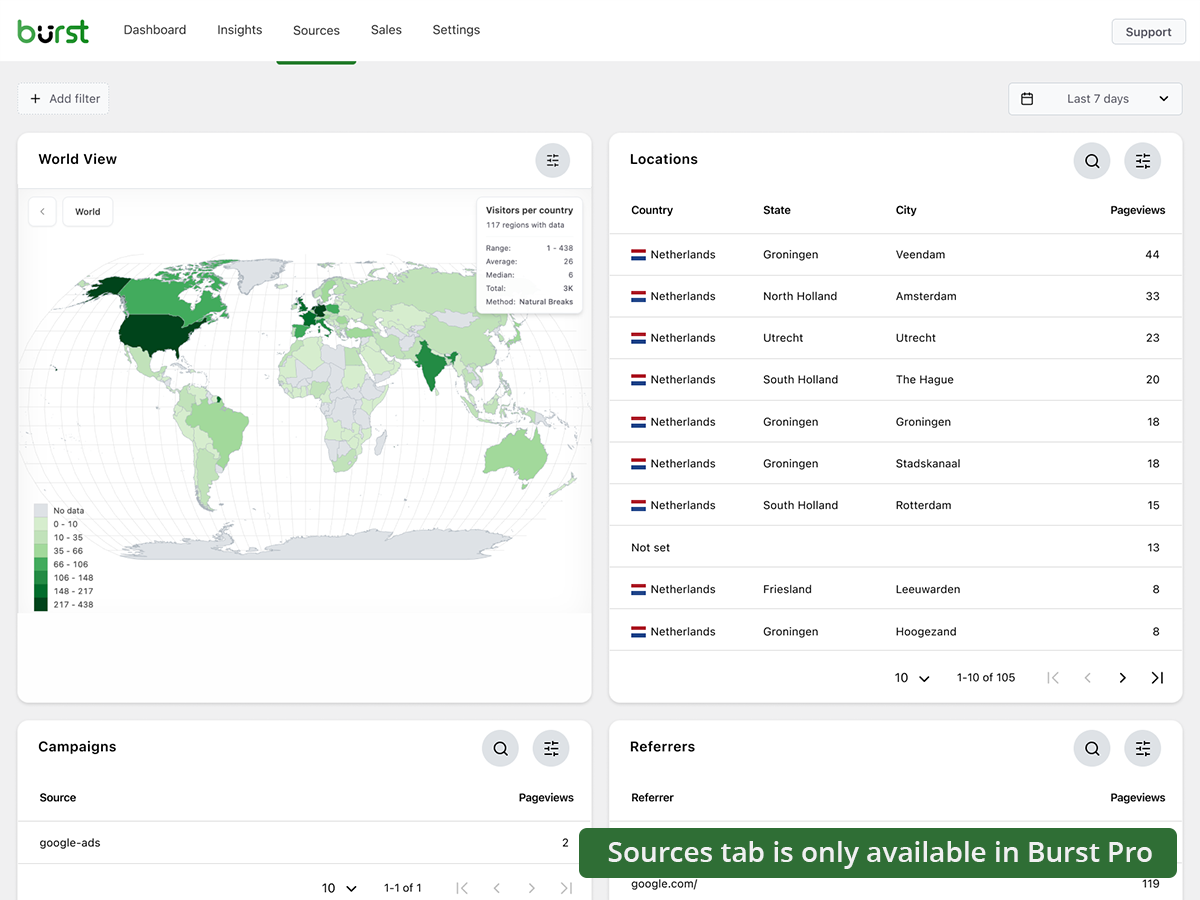
Geographic data (visitor breakdown by country, region, and city) is available from the Creator plan at $49/year and above. The geographic dashboard provides a country map visualization with optional metric switching between bounce rate, session duration, and conversion rate by geography; a region and city-level breakdown for local businesses and targeted content strategies; and revenue by location data when the WooCommerce integration is active (Business plan).
The geographic visualization includes both a map view and a ranked table. Switching from visitor count to bounce rate on the map is a practically useful capability for sites running regional marketing campaigns where engagement quality by geography matters as much as volume. Note for free version users: geographic data is not included at zero cost, which is a meaningful limitation compared to WP Statistics. If country-level analytics is a priority and budget is a constraint, this is an important consideration when comparing the two plugins.
UTM and campaign tracking (Creator plan and above)
UTM campaign parameter tracking is available from the Creator plan at $49/year. When UTM parameters are appended to incoming URLs (from email campaigns, paid ads, or social media links), the plugin captures and attributes the source, medium, campaign, content, and term values. The campaign tracking dashboard shows sessions and conversions attributed to each UTM source, medium, and campaign name, and integrates with the goal tracking system so campaign-attributed conversion rates are calculated automatically.
For site owners running any paid advertising or email marketing, UTM tracking turns the Burst dashboard from a passive traffic counter into an active marketing performance tool. At $49/year for a single site, Creator is the most affordable UTM-capable WordPress analytics setup in the privacy-first category.
WooCommerce and sales analytics (Business plan)
WooCommerce revenue tracking is available from the Business plan at $99/year per site. After activating the WooCommerce integration, Burst tracks the complete purchase funnel from product page to completed transaction: product views, add-to-cart events, checkout starts, completed purchases, and abandoned cart drop-off percentage at each funnel stage.
The sales dashboard shows total revenue, average order value, and conversion rate alongside a funnel visualization of where shoppers exit the buying process. Revenue is breakable by product (which products generate the most income) and by traffic source (which marketing channel drives the highest-value buyers). Because all data is stored locally, the WooCommerce integration is GDPR-compliant out of the box and requires no consent banner to collect order-level data. Setup is automatic: Burst detects WooCommerce on activation and begins tracking orders without additional configuration, custom event code, or Google Tag Manager.
Automated reporting and email delivery
Email reports are available in the free version of Burst Statistics. The reporting feature delivers a summary of key metrics (visitors, pageviews, top pages, and referrer sources) on a weekly or monthly schedule to any email addresses configured in the settings.
The Agency plan adds automated client reporting capabilities, including custom report scheduling (daily, weekly, or monthly), custom comments and text blocks added directly next to graphs for client context and annotation, and report formats suitable for client-facing delivery. For agencies managing privacy-first analytics across multiple client sites, the automated reporting layer replaces the manual work of exporting data and preparing summary documents. At $199/year for unlimited sites, the per-site cost is negligible for agencies with more than a handful of clients.
Privacy and GDPR compliance
Burst Statistics’ privacy-first position is not a feature; it is the architecture. All data is processed on your own WordPress server. No visitor data is transmitted to Burst Statistics B.V., to Google, or to any other third party. The team explicitly states they have no access to your data unless you voluntarily enable anonymous usage insights (disabled by default).
The cookieless tracking option is the most practically significant compliance feature. When enabled, Burst uses server-side techniques to distinguish visitors without placing a browser cookie, meaning no cookie consent banner is legally required for analytics under the EU ePrivacy Directive. No cookie consent banner is needed. The developer acknowledges a minor accuracy trade-off in cookieless mode, which is stated clearly in the plugin FAQ.
A privacy audit tool built into the plugin reviews your configuration and flags potential compliance issues: whether cookieless mode is active, how long data is being retained, and whether any settings create exposure under GDPR, CCPA, DSGVO (Germany), AVG (Netherlands), RGPD (Spain/France), PECR (UK), and NFADP. For site owners in regulated markets, this tool replaces a significant amount of manual compliance checking. As with any analytics implementation, formal legal obligations in specific jurisdictions should be verified with legal counsel.
Pricing and license value
Burst Statistics is available free on WordPress.org with no pageview or visitor limits. Pro plans are available at burst-statistics.com with a 14-day free trial and a 30-day money-back guarantee (44 total risk-free days). All pricing is annual. Pricing verified August 20, 2026.
Single-site plans:
- Creator: $49/year. Geographic data (country, region, city), UTM and campaign tracking, advanced filters and data segmentation, automatic database archiving, priority developer support. Unlimited pageviews. Includes all free features.
- Business: $99/year. Everything in Creator, plus the complete WooCommerce sales dashboard: revenue attribution, purchase funnel analytics, revenue by product and traffic source, average order value tracking. The recommended plan on the pricing page.
- Agency: $199/year. Everything in Business, plus automated client reporting with custom scheduled email delivery (daily/weekly/monthly), custom comments on reports, and unlimited site coverage.
Multi-site plans:
- Creator: $79/year for up to 5 sites.
- Business: $119/year for up to 5 sites.
- Agency: $199/year for unlimited sites (same price as the single-site Agency plan, making unlimited the practical choice for any multi-site need).
Against WP Statistics Premium: Burst Creator at $49/year undercuts WP Statistics Single Site Premium at $119/year significantly. Burst Business at $99/year also undercuts WP Statistics at the feature-comparable tier, while WP Statistics includes geographic data in its free tier, which partially narrows this gap if geographic reporting is the only requirement.
Against MonsterInsights and Analytify: these are fundamentally different product categories. MonsterInsights Plus at $99.50/year and Analytify StartUp at $99/year both require a Google Analytics 4 property. Burst Statistics does not. If you are choosing between these, the decision is fundamentally about whether you want self-hosted analytics (Burst) or a GA4 dashboard inside WordPress.
The free version merits direct emphasis: Burst Statistics free is a fully functional analytics setup with no visitor or pageview cap, three custom goals, and real engagement tracking. It is not a time-limited trial. For site owners who do not need geographic data or UTM tracking, the free version may be the permanent answer.
Pros and cons
Pros
- Best user satisfaction rating in the self-hosted WordPress analytics category: 4.9/5 stars from 182 reviews, with 171 five-star ratings.
- Free tier is genuinely capable. Unlimited pageviews and visitors, three custom goals, engagement tracking (outgoing links, form fills, reading engagement), 404 detection, real-time visitor count, and email reports at zero cost.
- Cookieless tracking option with no consent banner needed. Directly addresses the EU ePrivacy Directive and CCPA requirements without adding consent management complexity.
- 100% self-hosted data. No data transfer to Google, to Burst Statistics B.V., or to any third party.
- Tracking script under 4 KB. Minimal frontend performance impact for sites pursuing Core Web Vitals targets.
- Tracking health monitoring (v3.6.3) alerts administrators immediately if data collection is disrupted by a caching issue, plugin conflict, or script failure.
- Built by Team Updraft, the developers behind UpdraftPlus, WP-Optimize, and All-In-One Security. Long-term plugin maintenance is well-supported.
- Agency plan at $199/year covers unlimited sites with automated client reporting. Strongest multi-site pricing in the category.
- 44 days risk-free: 14-day free trial plus 30-day money-back guarantee on all paid plans.
- Community benchmarks provide opt-in anonymized comparisons against other Burst users.
- Free Search Console integration surfaces keyword and search impression data without a paid plan.
Cons
- Geographic data (country, region, city) is not included in the free version. WP Statistics provides geographic data at no cost, a meaningful gap at the zero-cost tier.
- UTM campaign tracking requires Creator plan ($49/year). Sites running any paid advertising or email campaigns cannot attribute traffic sources without upgrading.
- Goal tracking is capped at 3 in the free version. WP Statistics has no goal cap in its free tier.
- No Google Analytics integration. Burst Statistics is not a GA4 connector. Site owners who need GA4 data inside WordPress must use a different plugin.
- WooCommerce revenue and sales funnel tracking requires Business plan ($99/year). Basic pageview tracking applies to WooCommerce pages in the free version but order-level revenue data is paid-only.
- Cookieless tracking has an acknowledged accuracy trade-off. The FAQ states this explicitly. For high-stakes analytics decisions, this caveat applies.
- 200,000 active installs is smaller than WP Statistics (600,000+), Matomo for WordPress, or any GA4 connector in the category. Fewer public tutorials and a smaller community to consult for plugin-specific questions.
- No AI analytics features. No natural language query interface, AI-generated insights, or predictive analytics.
- Automated client reports with custom scheduling require the Agency plan ($199/year). Basic weekly or monthly email reports are free, but agency-grade reporting with custom comments and flexible scheduling is gated.
Alternatives to Burst Statistics
- WP Statistics. The most-installed self-hosted analytics plugin for WordPress at 600,000+ active installs. WP Statistics includes geographic data and unlimited goals in its free tier, which Burst does not. The Premium tier at $119/year for a single site covers Search Console integration, campaign tracking, real-time live feeds, and scheduled reporting. WP Statistics users consistently note that the interface is more complex than Burst; Burst users note that Burst is more readable. The direct choice depends primarily on whether free geographic data or interface simplicity is the higher priority. See our WP Statistics review for a full breakdown.
- Matomo for WordPress. An open-source self-hosted analytics platform with a full feature set: eCommerce goals, heatmaps, session recording, form analytics, and complete data ownership. More complex to configure and maintain than Burst Statistics. The right choice for organizations that need a full Google Analytics replacement with depth equivalent to GA4. For standard WordPress traffic monitoring, Burst Statistics is significantly simpler to operate.
- MonsterInsights. The most-installed WordPress GA4 dashboard plugin at 2 million active installs. Requires a Google Analytics 4 account and sends data to Google. The right choice when GA4 is your analytics standard, when AI analytics queries (Charlie Chat) are a priority, or when deep eCommerce attribution tied to Google Ads is needed. Not a privacy-first option. See our MonsterInsights review for a full breakdown.
- Analytify. A WordPress GA4 dashboard plugin competing with MonsterInsights on price. Analytify StartUp at $99/year for 2 sites includes WooCommerce eCommerce tracking and UTM reporting from the lowest paid tier. Like MonsterInsights, Analytify requires a GA4 account and sends data to Google. See our Analytify review for a full breakdown.
- ExactMetrics. Another WordPress GA4 connector from the same parent company as MonsterInsights, with similar pricing and feature set. See our ExactMetrics review for a direct comparison.
- Site Kit by Google. The official free plugin from Google connecting WordPress to GA4, Search Console, PageSpeed Insights, and AdSense. Zero cost but sends all data to Google. The opposite of the privacy-first position. See our Site Kit by Google review.
- Plausible Analytics. A SaaS-based privacy-first analytics platform with a similar privacy positioning to Burst but operating as an external service. Starts at $9/month. The right choice if you want a managed analytics service without Google rather than a WordPress-native solution.
- Independent Analytics. A free WordPress plugin with a similar simplicity-first positioning to Burst. Comparable interface philosophy and self-hosted data storage. A smaller install base and feature set than Burst. Worth testing if the free Burst tier’s 3-goal limit is a friction point.
Final verdict
Burst Statistics earns its 4.9-star rating. That satisfaction score reflects a product that has found a clear audience and served it well: WordPress site owners who want useful traffic data, prefer not to route that data through Google, and are not willing to spend hours configuring a complex analytics stack.
The free version holds up on its own merits. Unlimited pageviews with no expiry, three custom goals, engagement tracking, 404 detection, real-time visitor counts, and email reports make Burst Statistics free a genuinely useful analytics setup for the majority of personal sites, blogs, and small business WordPress installs. The absence of geographic data and UTM tracking in the free tier are real gaps, but neither is critical for site owners whose primary question is simply “how much traffic am I getting and where are readers spending time.”
The paid plans are priced fairly. Creator at $49/year for geographic data and UTM tracking is the right answer for sites running any marketing activity. Business at $99/year adds WooCommerce revenue tracking and is directly competitive with any alternative in the privacy-first analytics category. Agency at $199/year for unlimited sites with automated client reporting has no close competitor at the same price.
The Team Updraft developer connection matters. Burst Statistics is not maintained by a solo developer whose support commitment is a personal bet. The same team that keeps UpdraftPlus running across millions of installs maintains Burst Statistics. Version 3.6.3 shipped tracking health monitoring and community benchmarks: substantive quality-of-life additions, not cosmetic changelog entries.
The honest limitation to state directly: Burst Statistics is not the right tool if Google Analytics integration, AI analytics queries, cross-device identity tracking, or a feature set equivalent to enterprise analytics platforms is the goal. It is a WordPress-native, privacy-first traffic analytics tool, and it executes that scope clearly and well.
For the site owner who has avoided analytics because Google Analytics felt like overkill, or who deactivated a GA4 connector because the compliance headache was not worth the reports: Burst Statistics free is the lowest-friction path to meaningful traffic data that currently exists for WordPress.