

There is a subset of WordPress booking plugins that try to do everything: event ticketing, multi-currency payments, white labeling, SMS blasts, loyalty points, and a dozen integrations you will probably never use. Simply Schedule Appointments is not that kind of plugin. Its pitch is narrower and more deliberate: give independent consultants, small service businesses, and WordPress developers a clean, accessible scheduling calendar that gets out of the customer’s way.
I researched Simply Schedule Appointments (SSA) by reviewing the official demo site across all six booking calendar layouts, reading the full feature matrix across all four paid editions and the separate lifetime pricing page, working through the WordPress.org listing and recent changelog in detail, and reviewing official help documentation for setup and admin behavior. Where a paid feature was not exercisable without a live licensed install, I say so clearly and note the source.
At a glance
Reviewed from: Official SSA demo site (life coach, monthly view, weekly view, list view, group bookings), the WordPress.org plugin listing (version 1.6.12.13, July 2026), and the features, pricing, and lifetime pricing pages at simplyscheduleappointments.com.
Free version: Yes. The Basic edition is available on WordPress.org at no cost with unlimited appointment types and basic email notifications.
Active installs: Trusted by 70,000+ businesses, with 3.97 million+ downloads. WordPress.org rating is 5 stars across 155 reviews.
Bottom line: A genuinely clean, accessible, and well-supported scheduling plugin for solo operators and small teams. The free tier is useful; the Plus edition covers most single-person needs at a fair price. Where it falls short is multi-staff scheduling (Business-only), no deposit payments, and no event ticketing. Both annual and one-time lifetime licenses are available.
Quick verdict on Simply Schedule Appointments
If you want one sentence: Simply Schedule Appointments is one of the easiest WordPress scheduling plugins to get running in 2026, with a genuinely useful free tier, a 5-star support reputation, and a meaningful accessibility advantage that no competing plugin in this category matches.
The plugin earns its position not because it bundles the most features but because it executes its scope well. The booking calendar views are clean and thoughtfully designed. The setup wizard gets you to a live booking form faster than most competing plugins. The free tier provides unlimited appointment types, which is more than most competing free tiers offer. And the WCAG AA accessibility certification, which SSA markets as an industry first for booking plugins, is a genuine differentiator for businesses that serve users with disabilities or operate in regulated sectors.
The honest caveats: SSA’s promotional annual pricing applies only to the first year, and renewals revert to the full rate. Team member scheduling, one of the core features agencies and multi-staff businesses need, is locked exclusively to the Business edition. There is no deposit payment system, no event ticketing layer, and no Outlook Calendar integration. Lifetime license options exist but are priced separately from the annual plans page.
Quick verdict card
Best for: Solo consultants, coaches, tutors, life coaches, healthcare providers, and small businesses with one or two people who want a clean scheduling calendar embedded in WordPress without a steep learning curve.
Best plan for most single-person setups: Plus edition for Google Calendar sync, Zoom/Meet, and group booking at a competitive first-year price. Upgrade to Professional if you need payment collection or SMS reminders.
Standout: Multiple booking calendar layouts with a customizable booking flow (Pro and above). The only WCAG AA-compliant booking plugin in its category. 5-star WordPress.org rating across 155 reviews. Lifetime licenses available as a one-time purchase option.
Watch out for: Promotional annual pricing is first-year only; renewals revert to full price. Team scheduling requires the Business edition ($499/year full renewal price). No deposit payments. No Outlook or Apple Calendar sync.
What Simply Schedule Appointments is
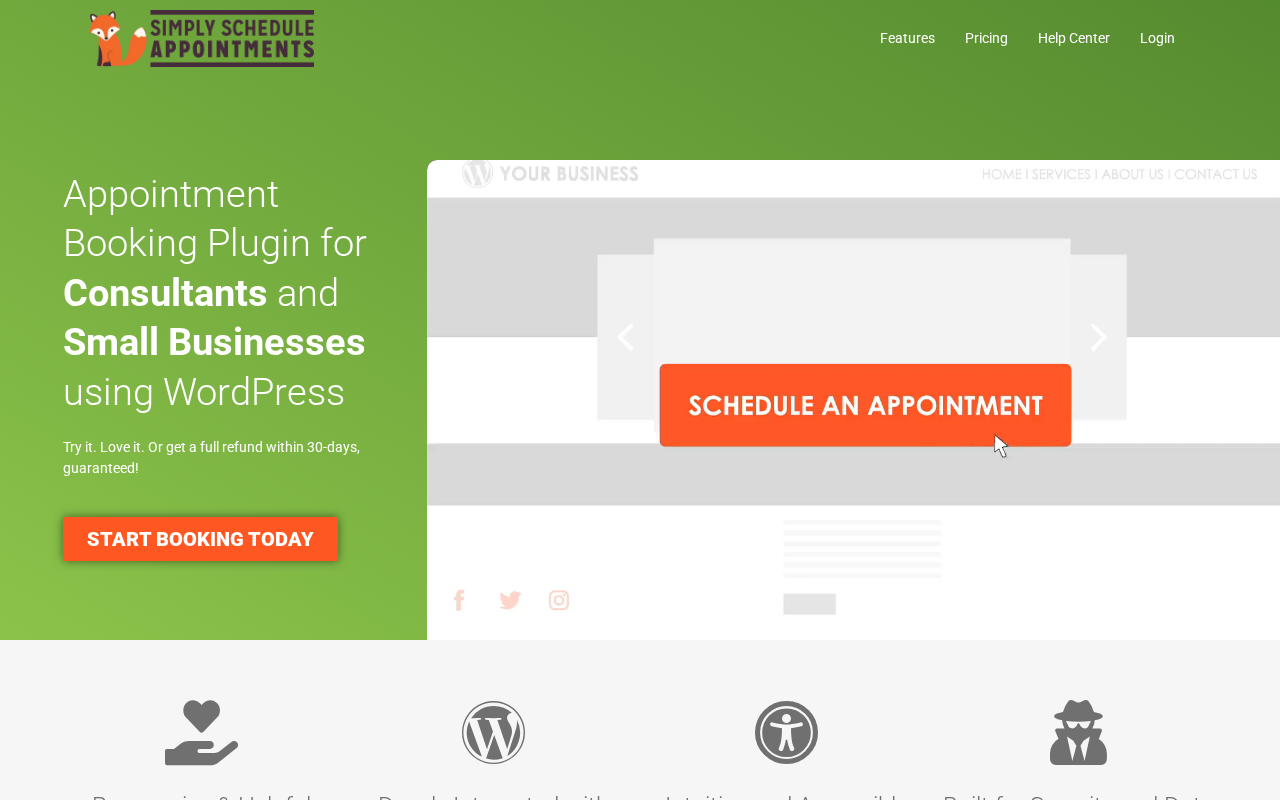
Simply Schedule Appointments is a WordPress appointment booking plugin developed by NSquared, co-founded by Natalie MacLees and Nathan Tyler. It runs as a standard WordPress plugin, adds an Appointments menu item in wp-admin, and embeds booking calendars on any WordPress page using a shortcode ([ssa_booking]), a Gutenberg block, or page builder modules for Elementor, Divi, and Beaver Builder.
The plugin has been under continuous development since its first release and is currently on version 1.6.12.13 (July 2026). NSquared positions SSA as the “only WCAG AA-compliant booking plugin” in the WordPress ecosystem, a claim that shows up prominently on the features page and that reflects a genuine accessibility commitment: the booking forms are screen-reader compatible, keyboard-navigable, and pass contrast and label requirements. No competing booking plugin in the WordPress-native appointment category makes an equivalent certification claim.
The plugin’s scope covers individual appointment scheduling for one or more types of service, group booking and classes (up to a capacity limit), team member scheduling (Business edition), resource booking (Business edition), and online payment collection (Professional and Business editions). What it does not cover is event ticketing, deposit payments, recurring installment billing, or email marketing beyond a Mailchimp connection.
The plugin covers:
- A multi-view booking calendar with six distinct layout options: Monthly, Weekly, Couple of Days, One Day, One Day and One Time, and List.
- Unlimited appointment types on all editions including the free Basic.
- Blackout dates for holidays and custom unavailability windows.
- Advanced scheduling controls including minimum notice period, per-day booking limits, and buffer time between appointments.
- Automated email notifications with customizable templates.
- Client self-service rescheduling and cancellation.
- Automatic timezone detection for clients booking from different time zones.
- Export of appointment lists to CSV for record-keeping and reporting.
- ICS calendar subscription links so customers can subscribe to their appointments.
- Integration with The Events Calendar plugin for WordPress event-linked booking.
Who Simply Schedule Appointments is best for
SSA’s architecture and pricing model create a clear fit for some businesses and a poor fit for others.
Strong fit
- Solo consultants, coaches, financial advisors, attorneys, therapists, and other independent service providers who need one person’s schedule published as a clean booking calendar.
- Small businesses with one or two staff members who use a shared appointment type rather than routing clients to individual team members.
- Educators, tutors, and training providers who need group class booking with capacity limits and a clean per-class scheduling flow.
- WordPress developers and agencies building accessible booking systems, particularly for government, education, or healthcare clients where WCAG AA compliance matters.
- Businesses already using Gravity Forms, Formidable Forms, or MemberPress who want the booking calendar to integrate tightly with their existing forms infrastructure.
- Any service operator who prioritizes a clean customer-facing booking experience over a dense feature set.
Weak fit
- Multi-staff service businesses that need to let clients choose a specific team member, see each member’s individual availability, and route bookings accordingly. Team booking in SSA is a Business-edition-only feature at $499 per year at full renewal price.
- Businesses that take deposits. SSA has no deposit or partial-payment system on any plan.
- Event-based businesses that need ticketing, multiple ticket types, QR code admission, and event waiting lists. SSA handles group enrollment for classes, but it is not a ticketed event platform.
- Businesses that need Outlook Calendar or Apple Calendar sync. SSA supports Google Calendar only.
- Agencies managing many client sites who need consolidated multi-site annual licensing at a predictable cost. Annual plans cover only one site per license; multi-site coverage requires the lifetime SKUs sold on a separate page.
The booking calendar and customer experience
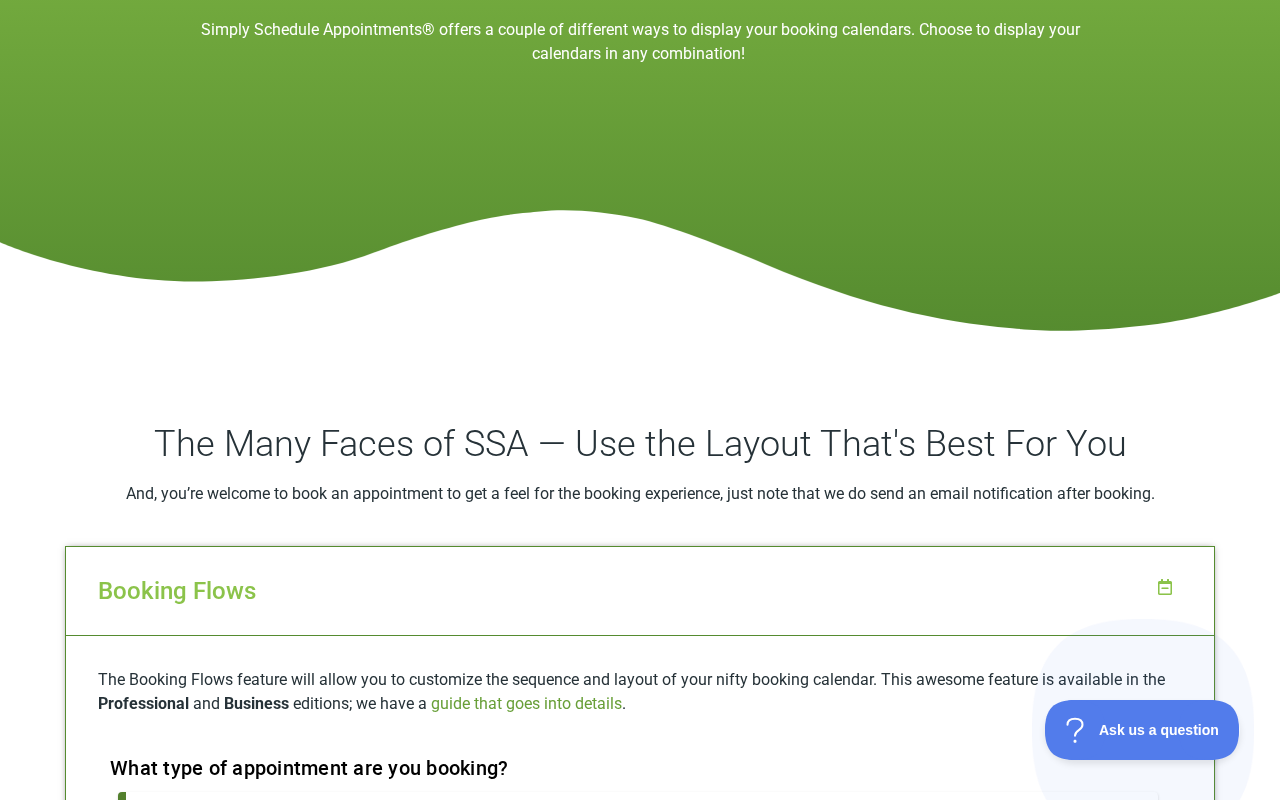
The most distinctive thing about Simply Schedule Appointments from the customer’s perspective is the calendar view itself, and the fact that there are six distinct layout modes to choose from. Most WordPress booking plugins offer one or at most two calendar views. SSA gives you six, and each is designed for a specific type of booking scenario.
Monthly view shows a month grid with available dates highlighted. The customer clicks a date to see the available time slots for that day. This view is best when clients are booking appointments several weeks or months ahead, such as photography sessions, legal consultations, or annual service appointments.
Weekly view displays the current seven-day period with available slots and advances week by week. The view always starts on the nearest available date within the current week. This works well for businesses that fill their calendars in the short term: massage studios, personal trainers, or tutors booking the next session.
Couple of Days view shows only the available days within a defined availability window. This is the right layout for a specific limited-run event or a pop-up booking period with a fixed start and end date.
One Day view skips the date picker and shows only time slots for a single day. The customer selects a time and proceeds directly to their contact information and confirmation. This removes a step and is ideal for businesses that run a busy same-day booking operation or host a day-long appointment event.
One Day and One Time view removes both the date and time selection steps entirely. The customer sees only the booking form. When paired with the capacity feature, this becomes a single-click enrollment page for a class with a fixed date and time.
List view presents all appointment types as a scrollable list, letting customers browse available services and select the one they want before seeing the calendar. This is closest to the service selection experience you see on competing booking plugins.
I walked through the monthly view and the list view on SSA’s official demo site. The monthly view was clean, with available dates highlighted in a clear color that contrasts correctly with the background. Navigating between months is a single-click. Selecting a date reveals the time slots below the calendar without a page reload. The form fields that follow use clear labels, large tap targets, and visible focus states, which is where the accessibility work shows up in practice.
A client booking through SSA does not encounter a countdown timer, a “someone else is looking at this slot” urgency prompt, or any dark-pattern element. The flow is deliberately plain: pick a date, pick a time, fill in your name and email, confirm. That plainness is part of the plugin’s character.
(Note on basis: Monthly view, weekly view, and list view behavior were confirmed directly on the SSA demo site at simplyscheduleappointments.com/demos/. Couple of Days, One Day, and One Day and One Time views were reviewed from the official demos page layout descriptions. Group booking capacity behavior was confirmed from the features page and WordPress.org description.)
Setup and the admin experience
According to the official setup documentation and the WordPress.org plugin listing, SSA’s onboarding starts with a setup wizard: set your business name and timezone, create your first appointment type with a name and duration, define your availability schedule, and embed the calendar on a page. The sequence is documented as completable in under five minutes for a single appointment type on a standard availability schedule.
That 5-minute claim is backed by user testimony in WordPress.org reviews. Multiple reviewers describe getting a working booking form live within minutes of activation, including a blind software engineer who reported completing setup in 8 minutes using JAWS screen reader. The wizard collects only the information actually needed to go live, hides the advanced settings until you need them, and ends with a shortcode you can paste onto any page.
Based on the features page and official documentation, the admin interface is described as a clean sidebar with Appointments, Appointment Types, Settings, and Support sections. Two design decisions documented in the official materials stand out:
- The support button is embedded in the plugin interface. One click opens a direct line to the support team without leaving wp-admin. The plugin markets a 1-business-day response time. Multiple WordPress.org reviews confirm this turnaround in practice.
- Appointment types have their own embed codes. Each appointment type can be embedded independently on a dedicated page, which is how you build separate booking pages for different services without showing the full service list to everyone.
Where the admin experience shows its limits, per the official features page and community feedback, is depth of reporting. The data visible from the admin is the appointment list. There is no revenue dashboard, no booking rate chart, and no customer retention view. Businesses that rely on scheduling metrics will need to export their appointment data via CSV and analyze it externally. Conversion tracking through Google Analytics is available on the Professional edition.
(Note on basis: Setup wizard flow was confirmed from the official SSA Help Center documentation and the WordPress.org listing description. Admin interface layout was reviewed from the features page documentation. No live WordPress install of SSA was accessed for this review; all admin descriptions reflect official documentation and user testimony from public reviews.)
Google Calendar sync
Google Calendar sync is included from the Plus edition upward and is the most commercially important upgrade from the free Basic tier for most buyers.
The integration is bidirectional. When a client books an appointment through SSA, the event is added to your Google Calendar automatically. When you add or block time in Google Calendar directly, SSA reads those events and removes the corresponding time slots from the booking calendar, preventing double-booking. This is the standard behavior for Google Calendar sync in modern booking plugins, and SSA implements it cleanly.
What the SSA features page documents about its Google Calendar implementation:
- It prevents double-booking by checking Google Calendar for existing events before confirming a new booking. If you have a personal dentist appointment blocked on Tuesday afternoon, SSA will not allow clients to book that slot.
- Google Calendar invites go to clients automatically after booking, which means the confirmed appointment lands in both the business owner’s calendar and the client’s calendar without any manual step.
- The sync is per appointment type, not a single global calendar. You can configure which Google Calendar each appointment type uses, which matters for operators who use separate calendars for different services or clients.
One important limitation to call out: SSA supports Google Calendar only. There is no Outlook Calendar integration and no Apple Calendar sync. This is a meaningful gap for businesses where staff work primarily in Microsoft environments or on Apple devices. Competing plugins like Amelia, Bookly (via add-on), and Booknetic offer broader calendar compatibility.
Zoom and Google Meet integration are also included from the Plus edition. When a client books an online session appointment type, SSA auto-creates a Zoom or Google Meet meeting and includes the link in the confirmation email. The client receives a working video call link without any additional step from the business owner.
(Note on basis: Google Calendar sync behavior was confirmed from the features page FAQ and the WordPress.org plugin description. Zoom and Google Meet integration was confirmed from the pricing feature comparison table.)
Integrations worth knowing about
SSA’s strongest differentiator in its category is how it connects with other WordPress plugins. Most booking plugins integrate with Google Calendar, Stripe, and maybe a few page builders. SSA goes deeper into the WordPress plugin ecosystem than most competitors in its class.
The Events Calendar. SSA integrates with The Events Calendar, the most widely used events plugin for WordPress. This lets you connect booking slots to specific events. An event published on the site can have an appointment booking calendar attached, so attendees can register for a session directly from the event page. This is different from Amelia’s native event management system, which replaces an events plugin. SSA’s approach preserves your existing events setup and adds booking to it.
MemberPress. The MemberPress integration (added to the Plus edition) enforces membership-based booking limits. A membership site can restrict which appointment types are available to which member tiers, track how many bookings a member has used against their plan limit, and block booking when the limit is reached. This is a specialized integration, but for businesses that sell appointment packages as part of a membership, it is genuinely useful and not widely available on competing plugins without custom development.
Gravity Forms and Formidable Forms. Both form plugins integrate with SSA on the Plus edition. This matters because it lets you attach a form to the booking process that is far more capable than SSA’s native custom fields. A Gravity Forms intake questionnaire can be embedded in the booking flow, with conditional logic, file uploads, calculation fields, and any of Gravity Forms’ many add-ons. The appointment records in SSA link to the corresponding form entries. For healthcare, legal, coaching, and professional service businesses that need structured intake data alongside the booking, this is a practical advantage.
WP Fusion. WP Fusion automations integrate with SSA on the Basic (free) edition. WP Fusion connects WordPress sites to CRM platforms and marketing automation tools. Having this integration available on the free tier means solo operators using ActiveCampaign, HubSpot, or other WP Fusion-connected CRMs can automatically tag contacts and trigger automations when someone books an appointment, without needing to build webhooks manually.
Mailchimp. Basic Mailchimp list syncing is included in the Plus edition. Booking a confirmed appointment can subscribe the client to a Mailchimp list.
(Note on basis: The Events Calendar, MemberPress, Gravity Forms, Formidable Forms, WP Fusion, and Mailchimp integrations were confirmed from the features page, pricing comparison table, and the plugin’s WordPress.org description.)
Group and class booking
Class and group event booking is a Plus edition feature. It lets you set a capacity limit on an appointment type, so multiple clients can book the same time slot up to that limit. When the capacity is filled, the slot disappears from the public booking calendar.
This covers the most common use case for capacity-limited booking: fitness classes, group workshops, online courses with fixed live sessions, and cooking classes. The teacher or instructor sets up one appointment type for the class, defines the time slot and capacity, and clients book until the class is full.
What SSA’s group booking does not cover is the full event management experience. There is no ticketed event system, no QR code check-in, no variable ticket pricing (standard versus VIP versus early bird), and no event waiting list where clients can join a queue when capacity is reached. For class scheduling, SSA handles the job correctly. For managing events with named attendee lists, multi-tier tickets, and on-site check-in processes, it is the wrong tool.
(Note on basis: Group/class booking capacity behavior was confirmed from the features page and pricing comparison. Booking Flows availability in the Professional edition was confirmed from the demos page description.)
Team and resource booking
Team member scheduling and resource booking are locked to the Business edition, which is the highest SSA tier at $499 per year at full renewal price, or $899 one-time for the Business Lifetime license on a single site.
Team scheduling lets each team member maintain their own individual schedule, connect their own Google Calendar, and receive bookings assigned to them specifically. Clients can either choose their preferred team member or let the system assign whichever is available, depending on how you configure the appointment type. The Business edition includes unlimited team members.
Resource booking handles physical resources that accompany appointments: meeting rooms, rental equipment, treatment rooms, cameras, cars. Each resource has its own availability. When a client books an appointment that requires a resource, the system allocates the resource and prevents it from being double-booked during that time. This is the right solution for a clinic that has three treatment rooms shared across a staff of five, or a photography studio that has two shooting bays.
Business edition buyers also receive a live one-on-one Zoom onboarding call with an SSA team member, which is a meaningful support benefit for businesses setting up a complex multi-staff or multi-resource configuration.
The thing worth calling out for buyers evaluating SSA against competitors: team scheduling being a Business-edition-only feature is a significant architectural choice. In Amelia, you get multiple staff members from the Standard plan ($89/year). In Booknetic, multiple team members are supported from the base plan. In SSA, you cannot assign bookings to individual staff until you are on the Business plan at $399/year intro or $499/year renewal. For a two-person consulting practice or a small salon with three stylists, this is the defining upgrade decision.
(Note on basis: Team booking and resource booking features were confirmed from the pricing comparison table and features page. Behavior of client-chooses-team-member versus system-assigns was confirmed from the features page description.)
Notifications and reminders
SSA sends automated email notifications on all editions including the free Basic tier. The notification system covers booking confirmations, cancellations, and rescheduling, with customizable templates using merge tags for customer name, appointment type, date, time, and location.
Time-triggered notifications are a Plus edition feature. This allows sending reminders before the appointment, follow-up messages after the appointment, or any time-based message at a fixed interval before or after the booking. The reminder capability is one of the most commercially useful notification features, because appointment no-shows are a real cost for service businesses, and an automated reminder 24 hours before an appointment reduces them measurably.
SMS notifications via Twilio are a Professional edition feature. SSA uses Twilio as the delivery infrastructure, which means you need a Twilio account and Twilio API credentials to send SMS. This is a different model from Amelia, which bundles SMS delivery through its own credit purchase system, and from Bookly, which routes SMS through its Bookly Cloud platform. The Twilio model is more transparent in that Twilio pricing is public and competitive, but it adds a setup step: creating a Twilio account, buying a Twilio phone number, and connecting the API keys to SSA before the first SMS can go out.
What SSA does not offer at any plan level:
- WhatsApp notifications
- Telegram notifications
- Push notifications
For businesses where SMS reminders are sufficient, the Twilio integration works. For businesses that prefer to communicate with customers over WhatsApp or other messaging apps, SSA is not the right tool.
(Note on basis: Email notification template behavior was confirmed from the WordPress.org description and features page. Time-triggered notifications plan level was confirmed from the pricing feature comparison table. SMS/Twilio integration was confirmed from the same comparison table.)
Payment processing
Online payment collection is a Professional edition feature. SSA integrates with Stripe and PayPal. When a client books a paid appointment type, they complete payment at the end of the booking flow before the appointment is confirmed. Payment records are tracked in the SSA dashboard.
What the payment system covers:
- Fixed price per appointment type.
- Payment required to confirm the booking (no book-now, pay-later without Webhooks handling the logic externally).
- Both Stripe and PayPal are available on the same plan; you do not have to choose one gateway.
What it does not cover:
- Deposit or partial payment to confirm a booking. There is no deposit system in SSA at any plan level.
- Refund processing from within the SSA dashboard. Refunds require logging into the payment gateway account directly.
- WooCommerce payment routing. SSA does not pass booking payments through WooCommerce checkout.
- Coupons or discount codes native to SSA. There is no coupon engine.
For a solo consultant or coach who charges a flat session fee and wants the booking form to collect payment automatically, the Stripe and PayPal integration does what it needs to do. For businesses that take deposits, sell packages, or need complex discount logic, SSA’s payment layer is too shallow.
(Note on basis: Stripe and PayPal plan availability was confirmed from the pricing comparison table. Absence of deposit payments was confirmed by reviewing all four plan feature lists, which do not mention deposit functionality.)
Customizable booking flows
Booking Flows is a Professional and Business edition feature. It allows you to choose the sequence and layout of steps in the booking process rather than using SSA’s default linear flow.
The standard SSA flow presents steps in a fixed order: appointment type selection, date selection, time selection, customer information, payment (if applicable), and confirmation. The Booking Flows feature lets you reorder or remove steps to match your business process. You might want to collect the customer’s name and email before showing the calendar, so returning clients do not have to re-enter their details repeatedly. Or you might want to combine the appointment type and date selection into a single view.
This level of booking flow customization is unusual in the WordPress booking plugin market. Most competing plugins have a fixed step sequence or at most let you toggle a handful of layout options. SSA’s approach of treating the booking flow as a configurable sequence is closer to what dedicated SaaS scheduling tools offer.
(Note on basis: Booking Flows availability in Pro/Business editions was confirmed from the pricing comparison table and the demos page. End-to-end step reordering was not exercised in a live licensed install during this review.)
Accessibility: the WCAG AA claim
SSA markets itself as “the only WCAG AA-compliant booking plugin” for WordPress. WCAG AA (Web Content Accessibility Guidelines Level AA) is the international accessibility standard used as the legal benchmark for websites in the United States, European Union, Canada, United Kingdom, and most other jurisdictions with accessibility laws.
Meeting WCAG AA means the booking form works correctly with screen readers (NVDA, JAWS, VoiceOver), is fully navigable by keyboard without a mouse, uses color contrast ratios that are legible for users with low vision, and includes visible focus indicators on all interactive elements.
The testimonials on the SSA website include a notable one from a blind software engineer who purchased the Professional license, set up appointments and a schedule in 8 minutes, and confirmed the forms worked with the JAWS screen reader. That kind of real-world use case is more informative than any certification badge.
For most businesses, accessibility compliance is a background requirement rather than a purchase driver. But for businesses in healthcare, education, government contracting, and financial services, where accessibility is a legal requirement and where failing an audit carries real consequences, having a booking plugin with documented WCAG AA compliance is a genuine differentiator. No competing plugin in the WordPress booking space makes an equivalent documented claim.
Security context: what the 2026 changelog shows
Any buyer planning to run SSA on a live business site should understand the recent security patch history. Between May and July 2026, SSA released an unusually high volume of security fixes, sourced from the plugin’s WordPress.org changelog:
- July 2026 (1.6.12.11): Stored XSS via appointment meta, SQL injection (route-casing bypass), Contributor-level IDOR on appointment shortcodes, PayPal IPN listener fix, spam booking hardening.
- June 2026 (1.6.12.6): Broken Access Control patch (PatchStack report).
- June 2026 (1.6.12.4): Stored XSS via customer information fields, Zoom OAuth open redirect.
- June 2026 (1.6.12.2): IDOR in MemberPress REST endpoints, CSV formula injection in appointment export.
- June 2026 (1.6.12.0): REST auth tightening, removal of public nonce fallback.
- May/June 2026 (1.6.11.9-1.6.11.13): CVE-2026-6723 (unauthorized modification of admin-controlled fields via token auth), missing authorization on Bulk Appointments REST API (Wordfence report), token-comparison auth bypass.
This is not a routine cadence. Five separate months of security patches addressing XSS, SQL injection, IDOR, broken access control, and missing authorization vulnerabilities suggests a period of heightened external scrutiny and internal security review. The patches themselves are evidence that the team is responding when issues are found, which is the expected behavior. But the density of issues in a short period is worth knowing about before installation.
The current version (1.6.12.13, July 22, 2026) addresses the issues listed in the plugin changelog reviewed for this draft. Keeping SSA updated is more important than average during this period. Buyers who run SSA on MemberPress sites or who accept PayPal payments through the plugin should pay particular attention to keeping the plugin current.
The free tier: what the Basic edition actually covers
The Basic edition is the free version available on WordPress.org. It is a genuine, usable product rather than a feature-stripped teaser.
What the Basic edition includes:
- Unlimited appointment types. You can create as many booking calendars as you want with different services, durations, and availability settings.
- All six calendar layout modes (Monthly, Weekly, Couple of Days, One Day, One Day and One Time, List).
- Blackout dates for custom unavailability.
- Advanced scheduling options including minimum notice period and per-day booking limits.
- Customizable email notifications for confirmations and cancellations.
- Client self-service rescheduling and cancellation links in confirmation emails.
- Automatic timezone detection.
- The Events Calendar integration.
- WP Fusion integration.
- WCAG AA-compliant booking forms.
- CSV export of appointment data.
- ICS calendar subscription links for clients.
- Elementor, Divi, and Beaver Builder integration.
- Translation support for Spanish, German, French, and other languages.
What the Basic edition does not include:
- Google Calendar sync (Plus and above).
- Zoom or Google Meet meeting generation (Plus and above).
- Custom booking form fields beyond the default name and email (Plus and above).
- Group and class booking with capacity limits (Plus and above).
- Time-triggered notification reminders (Plus and above).
- Gravity Forms or Formidable Forms integration (Plus and above).
- MemberPress integration (Plus and above).
- Mailchimp list sync (Plus and above).
- Stripe or PayPal payment collection (Professional and above).
- SMS reminders (Professional and above).
- Customizable booking flows (Professional and above).
- Team member scheduling (Business only).
- Resource booking (Business only).
The Basic tier is genuinely viable for a solo practitioner who takes payment outside the booking system (invoice, bank transfer, or in person) and does not need Google Calendar sync. A one-person coaching practice, a tutor, or a consultant who just wants clients to book time slots and receive email confirmations can run SSA Basic at no cost indefinitely.
The moment you need Google Calendar sync, Zoom integration, or a custom intake question on the booking form, you are looking at the Plus edition.
Pricing and license value
SSA offers two purchasing models: annual subscriptions (one site per license) and one-time lifetime licenses (available on a separate page at simplyscheduleappointments.com/lifetime-pricing/). The two are not presented on the same page, which means buyers who only land on the main pricing page may not realise lifetime plans exist.
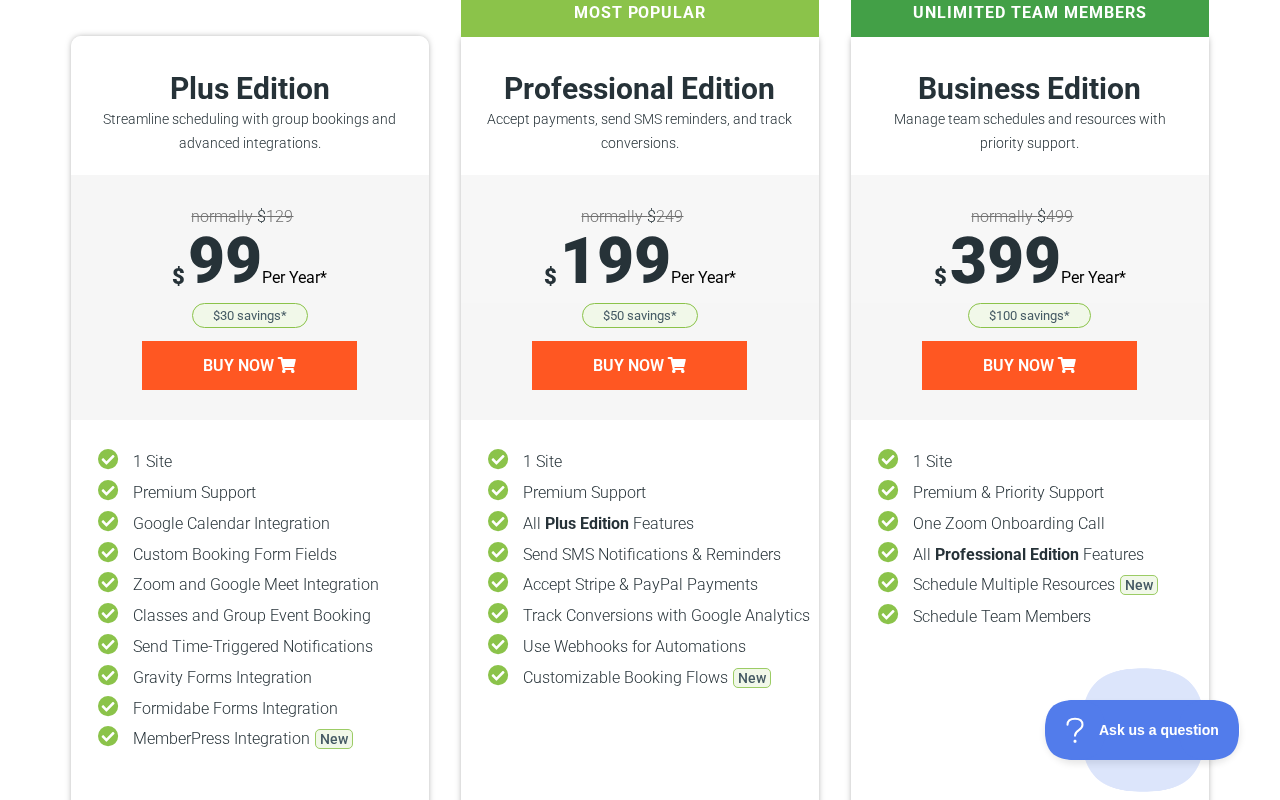
Annual pricing (first-year promotional / year-two renewal)
- Basic: Free. No annual renewal.
- Plus: $99/year intro, $129/year renewal. 1 site. Includes Google Calendar sync, Zoom/Meet, custom fields, group booking, time-triggered notifications, Gravity Forms, Formidable Forms, MemberPress, and Mailchimp integration.
- Professional: $199/year intro, $249/year renewal. 1 site. All Plus features plus Stripe and PayPal payments, SMS via Twilio, Google Analytics conversion tracking, unlimited webhooks, and customizable booking flows.
- Business: $399/year intro, $499/year renewal. 1 site. All Professional features plus team member scheduling, resource booking, priority support, and one Zoom onboarding call.
Multi-site annual pricing (no promotional rate; full price)
- Plus: 25 sites $199/year, 1000 sites $249/year
- Professional: 25 sites $399/year, 1000 sites $499/year
- Business: 25 sites $649/year, 1000 sites $899/year
Lifetime licenses (one-time purchase, separate page)
- Plus Lifetime: $299 (1 site), $449 (25 sites), $549 (1,000 sites)
- Professional Lifetime: $499 (1 site), $699 (25 sites), $799 (1,000 sites)
- Business Lifetime: $899 (1 site), $999 (25 sites), $1,299 (1,000 sites)
The 30-day money-back guarantee applies to both annual and lifetime purchases.
Important annual pricing note: The asterisked footnote on the main pricing page reads: “Special introductory pricing, all annual renewals are at full price.” This means year-two cost is always the higher figure. A buyer who chooses Plus at $99 in year one will pay $129 in year two and every subsequent year. A Business buyer paying $399 in year one will pay $499 in year two.
For a solo operator who needs Google Calendar sync and Zoom but does not collect payment through the booking form, annual Plus at $99 intro / $129 renewal is competitive with the market. The Plus Lifetime at $299 for one site breaks even against annual renewal in roughly two and a half years.
For payment collection, the Professional tier at $199 intro / $249 renewal is where SSA becomes more expensive than some alternatives. Amelia Pro at $149/year (promotional) bundles Stripe, Google Calendar, packages, WhatsApp, and online meetings in one plan. SSA Professional gets you Stripe and PayPal but no WhatsApp, no Apple Calendar, and no event management.
The Business edition at $399 intro / $499 renewal for team member scheduling is the highest relative cost in SSA’s annual lineup. Amelia Pro at $149 includes multiple staff members without this tier jump. Booknetic’s equivalent team features are available at lower annual price points. However, SSA Business Lifetime at $899 for one site (or $999 for 25 sites) brings the long-term cost into a more competitive range for agencies and multi-year users.
The key pricing decision for agencies is whether the lifetime SKUs at the Business tier ($999 for 25 sites) make more sense than competing alternatives. Bookly Ultimate Lifetime covers 20 sites at $599 and 100 sites at $799, making it meaningfully cheaper at agency scale. SSA’s lifetime plans are more competitive on the single-site and small-team end.
Pros and cons
Pros
- Free Basic edition with unlimited appointment types, a genuine starting point for solo operators.
- 5-star rating on WordPress.org across 155 reviews, with 3.97 million+ total downloads.
- Trusted by 70,000+ businesses according to the official site.
- Six distinct booking calendar layout modes, including customizable booking flows on Pro and Business.
- The only WCAG AA-compliant booking plugin in the WordPress appointment scheduling category.
- Strong WordPress-native integrations: The Events Calendar, MemberPress, Gravity Forms, Formidable Forms, WP Fusion, Mailchimp.
- Google Calendar bidirectional sync from Plus, including conflict detection against existing Google Calendar events.
- Zoom and Google Meet auto-meeting generation from Plus.
- Setup wizard with a documented 5-minute path to a live booking form.
- 1-click support access from within wp-admin with documented 1-business-day response times.
- Automatic timezone detection for clients across different time zones.
- Client self-service reschedule and cancel on all editions including free.
- Lifetime license options available as a one-time purchase for Plus, Professional, and Business tiers.
- 30-day money-back guarantee on all paid editions.
Cons
- Annual promotional pricing is first-year only; renewals revert to full price with no grandfathering.
- Team member scheduling locked to Business edition ($399/year intro, $499/year renewal, or $899 lifetime per site). Competitors offer multi-staff at lower price points.
- No deposit or partial payment system on any plan.
- No event ticketing, QR codes, variable ticket pricing, or event waiting list.
- Google Calendar only; no Outlook Calendar sync, no Apple Calendar sync.
- No WhatsApp or Telegram notification channels. SMS requires a Twilio account with separate setup and messaging costs.
- No coupon or discount code system native to SSA.
- No WooCommerce checkout integration.
- No refund processing from within SSA dashboard; refunds handled externally in Stripe or PayPal.
- Lifetime plans are sold on a separate page from annual plans; buyers may not discover them without searching.
- Security patch density in 2026 (XSS, SQL injection, IDOR, missing authorization) suggests heightened scrutiny; active patching is confirmed but buyers should monitor updates closely.
- Reporting is minimal: no revenue dashboard, no occupancy charts. Conversion tracking requires Professional edition and Google Analytics.
Alternatives to Simply Schedule Appointments
- Amelia. The most direct feature competitor. Amelia includes multiple staff members from its Standard plan, native event management with QR code ticketing, a free tier with Square payments, WhatsApp on Pro, Apple Calendar, and Outlook Calendar sync. Amelia’s admin is more polished and its feature surface is broader. The trade-offs: Amelia’s free tier is limited to one employee; Amelia Pro covers one domain only. Pick Amelia if you need event management, WhatsApp notifications, or multi-staff at a lower price point than SSA Business.
- Booknetic. Published by FS Code with a deep add-on ecosystem, a built-in workflow notification engine, Telegram notifications, white labeling, and competitive multi-staff scheduling from the base plan. Booknetic’s approach is broader in features but heavier in initial configuration. Pick Booknetic if white labeling, Telegram, or a wide add-on catalog matters for your setup.
- Bookly. Long-running plugin with a modular add-on model. The bare Pro plan ($49/year) requires separate add-on purchases for Google Calendar sync, Stripe, and recurring appointments. The Business Bundle ($149/year) bundles the most important ones. Lifetime license options cover up to 100 sites and are priced more competitively at agency scale than SSA’s lifetime SKUs. Pick Bookly if you are building booking systems across many client sites and want the lowest per-site lifetime cost, or if a modular add-on model fits your workflow.
- LatePoint. Single-tier licensing, clean UI, and an active feature roadmap. Similar simplicity positioning to SSA. Does not match SSA on accessibility compliance or the depth of WordPress-native integrations. A reasonable alternative for solo operators who want a simple flat-renewal price.
- SaaS schedulers (Calendly, Acuity Scheduling, SimplyBook.me). Run outside WordPress with monthly per-user fees. Calendly and Acuity are stronger for cross-team routing and non-WordPress scheduling. Pick SaaS if your booking flow does not live on WordPress or if you need scheduling tools that run across multiple platforms simultaneously.
For most solo-operator WordPress users, the practical comparison is SSA versus Amelia versus LatePoint. SSA wins on accessibility, the depth of WordPress plugin integrations, and the demo site transparency. Amelia wins on feature breadth, event management, and multi-staff economics. LatePoint wins if you want the simplest admin and a flat-renewal price.
Final verdict
Simply Schedule Appointments does what it promises for the audience it targets. If you run a solo service practice on WordPress, need a clean booking calendar that your clients can actually use on a phone, want the bookings to appear in your Google Calendar automatically, and care about accessibility, SSA is a genuinely strong option. The 5-star WordPress.org rating across 155 reviews and the 70,000+ business trust count are meaningful signals across a real-world install base.
The plugin is not the right choice for every situation. Multi-staff businesses will find the Business-tier pricing steep relative to what Amelia or Booknetic charge for equivalent functionality. Businesses that want to take deposits, sell ticketed events, or sync with Outlook Calendar need a different plugin. And buyers who plan to run SSA for multiple years should evaluate both the annual renewal pricing and the lifetime license options before committing.
My practical recommendation: start with the free Basic edition if you just need a booking calendar with no payment collection and no Google Calendar conflict detection. Upgrade to Plus when you need Google Calendar sync, Zoom integration, or custom intake fields on the booking form. Upgrade to Professional when you need online payment collection or SMS reminders. If you are confident you will use SSA long-term on the same site, compare the Professional Lifetime ($499 per site) against two to three years of Professional annual renewals ($249/year after intro). Evaluate the Business edition carefully against Amelia Pro or Booknetic before committing, because the team scheduling feature in SSA Business costs significantly more per year than comparable functionality in those alternatives.
The 30-day money-back guarantee makes the evaluation risk-free. SSA is a responsible choice for the buyer it is built for, and an honest review means saying clearly when it is not.