

Sixteen years. That is how long SlimStat Analytics has been running on WordPress sites, a tenure that dates back to April 2010 and puts it among the oldest continuously maintained analytics plugins in the entire WordPress plugin directory. In a category that has been reshaped repeatedly by Google Analytics migrations, privacy regulation, and a wave of privacy-first challengers, Slimstat has stayed operational through every major change. Seventy thousand active installs and 816 reviews with a 4.8-star average tell part of the story. The other part is what Slimstat actually does differently.
Slimstat Analytics is a self-hosted WordPress analytics plugin developed by VeronaLabs, a small team based in Tallinn, Estonia. The plugin captures every pageview, visitor session, and outbound click directly into your WordPress database. No data leaves your server. No Google account is needed. No measurement ID to configure. The access log at the heart of the plugin is not an aggregated dashboard — it is a live, line-by-line record of visitors as they arrive, almost like a real-time server log rendered into a readable WordPress interface.
This review covers version 5.5.0, released June 24, 2026, and tested up to WordPress 7.0.4. I worked through the official Slimstat Analytics website at wp-slimstat.com, the pricing page, feature pages and documentation, the WordPress.org plugin listing (version 5.5.0, 70,000+ active installs, 4.8/5 stars from 816 reviews), and the plugin changelog. Where paid Pro features were not directly accessible for testing, the relevant sections say so explicitly.
At a glance
- Audited on: wp-slimstat.com features, pricing, and documentation pages; the WordPress.org plugin listing (version 5.5.0, last updated June 24, 2026, tested up to WordPress 7.0.4); the plugin changelog and FAQ. Pricing checked against wp-slimstat.com/pricing/ on August 20, 2026.
- Free tier: real-time access log, 5 dashboard report views, geolocation (DB-IP Lite, no API key required), GDPR compliance mode (IP hashing, Do Not Track support), customizable dashboard layout, bot and IP filtering, admin bar stats, world map visualization, outbound link and file download tracking, content performance by page/category/author, traffic sources analysis, CSV data export, dynamic shortcodes, compatibility with W3 Total Cache/WP SuperCache/CloudFlare.
- Paid tier: Pro at $29/year for 1 site (regular price $39/year); 5-site and unlimited-site licenses also available. Pro adds: email digests, goals and funnels, interactive heatmaps, custom database configuration, advanced data export, user activity profiles (registered users), advanced Whois lookup, and network analytics for WordPress multisite. 14-day money-back guarantee.
- Bottom line: the most detailed real-time visitor tracking available in a self-hosted WordPress analytics plugin. Slimstat’s access log shows individual visitor sessions in a way no other analytics plugin matches. The free version is capable and genuinely self-contained. The $29/year Pro plan adds heatmaps, email digests, and a goals-and-funnels system that was completely redesigned in the 5.5.0 release. The trade-off against newer competitors is interface complexity and a higher learning curve for non-technical users.
Quick verdict
Slimstat Analytics earns its 4.8-star rating the old-fashioned way: by delivering a feature set that serious site owners actually use. The real-time access log is the plugin’s defining trait. When a visitor lands on your site, their session appears in the Slimstat access log within seconds: their country, browser, screen resolution, referrer, every page they visit in sequence, and how long they spent on each. This is not a session count or an aggregate metric. It is a record of each individual visit as it happens.
That level of detail positions Slimstat differently from competitors like Burst Statistics or WP Statistics, which prioritize simplicity and aggregate dashboards. Slimstat is for site owners who want to know what real visitors are doing, not just how many showed up. Researchers tracking referral patterns, publishers monitoring link traffic in real time, and developers troubleshooting bot traffic have used it for exactly this purpose for over a decade.
The free version is not a trial. It provides real-time tracking, geographic data via DB-IP Lite at no cost, traffic source analysis, outbound link tracking, content performance by page and author, CSV export, and a customizable dashboard — all without creating an external account. The $29/year Pro plan adds heatmaps, email digests, and the redesigned goals-and-funnels system from version 5.5.0.
The honest limitation: Slimstat has a steeper learning curve than Burst Statistics or even WP Statistics. The interface rewards the user who knows what they want to find, rather than the user who wants an opinionated “most important metrics” view. If your question is “how many visitors did I get this week,” Slimstat can answer it, but it will present that answer inside a more complex interface than most lightweight alternatives. If your question is “show me every visit from a specific country in the last 48 hours, what pages they read, and how they arrived,” Slimstat is the right tool in the self-hosted category.
Quick verdict card
- Best for: WordPress site owners, publishers, researchers, and developers who want granular, per-session visitor data with real-time access logs. Also strong for privacy-conscious site operators in GDPR-regulated markets who need self-hosted analytics with IP anonymization and Do Not Track support without sending data to Google.
- Best plan for single sites: Pro at $29/year (current promotional rate; regular $39/year) adds heatmaps, email digests, goals and funnels, and user activity profiles. For sites that only need the access log and traffic reports, the free version is a complete and permanent solution.
- Best plan for agencies and networks: the unlimited-site Pro license covers WordPress multisite installations and agency deployments. Network analytics consolidates data across a multisite installation into a single view.
- Standout: the real-time access log — a per-session, individual visitor record that shows browser, location, referrer, and full page sequence in real time. No other self-hosted WordPress analytics plugin provides this depth out of the box. 16 years of active development and a 4.8/5 rating from 816 reviews.
- Watch out for: steeper interface complexity than lightweight competitors; high-traffic sites can experience database table growth without proper data retention scheduling; no dedicated WooCommerce revenue or sales funnel tracking in any plan; some instability reported in the 5.4.x version cycle (5.5.0 addressed these issues).
What Slimstat Analytics is
Slimstat Analytics is a WordPress-native visitor tracking plugin that records individual sessions into your WordPress database and makes them queryable in real time through a set of dashboard reports and a live access log. It was first published to WordPress.org in April 2010 and is maintained by VeronaLabs, a development team based in Tallinn, Estonia.
The plugin’s core design differs from most analytics tools in one fundamental way. Rather than building a reporting layer around aggregate metrics — total visitors, total pageviews, bounce rate — Slimstat starts with a raw event log. Each visit is stored as a discrete record: visitor country, city, IP (hashed for GDPR compliance), browser, operating system, screen resolution, referrer, session entry point, pages visited in sequence, time spent, and outbound link clicks. The dashboard reports are built on top of that log. This means the data is always there at the individual level, not just as an aggregated summary.
This architecture predates the current generation of privacy-first analytics tools by more than a decade. When Burst Statistics launched as a simpler alternative and WP Statistics grew to 600,000+ installs, Slimstat continued on its own trajectory: feature-rich, detail-oriented, and designed for the site owner who wants full control over their analytics data rather than a simplified view of it.
Version 5.5.0 (June 24, 2026) is the current release. The major addition in this version was a complete redesign of the Goals and Funnels system, which now uses a modern card-based layout with funnel templates. This is a Pro feature and represents the most significant update to the paid tier in recent release cycles. The 5.4.x series had notable stability issues — the 5.4.2 patch addressed critical tracking failures and visitor identification problems that appeared after 5.4.0 and 5.4.1, and some users reported 503 errors and stopped-tracking behavior during that period. Version 5.5.0 is stable by comparison and the recommended version for any current evaluation.
The WordPress.org listing shows 70,000+ active installs and 816 reviews at 4.8/5 stars as of August 2026. Within the self-hosted analytics category, 70,000 is a smaller install base than WP Statistics (600,000+), Matomo for WordPress, or Burst Statistics (200,000+). The lower install count reflects Slimstat’s narrower positioning rather than any quality shortfall: it is a tool for a specific kind of site owner, and its user base reflects that.
Who Slimstat Analytics is best for
Strong fit
- WordPress publishers, bloggers, and content site operators who want to watch their real-time access log during a traffic spike — seeing individual visitors arrive, read specific pages, and follow links, as it happens.
- Site owners and developers who need to investigate traffic anomalies, detect bot activity, or trace the behavior of a specific referral source at the session level. Slimstat’s per-visit log supports this kind of investigation directly.
- Privacy-first operations in GDPR-regulated markets (EU, EEA) or CCPA jurisdictions that want fully self-hosted analytics with no data leaving the server. Slimstat hashes IP addresses by default, respects Do Not Track browser headers, and provides configurable data retention with scheduled deletion.
- Site owners who currently rely on hosting-level server logs but want the same detail inside a WordPress dashboard without parsing raw log files.
- WordPress developers and power users who want to use Slimstat’s shortcode API to embed specific report widgets directly into pages, posts, or sidebars — displaying live or recent visitor stats for specific content.
- Researchers, educators, and journalists running WordPress sites who want to monitor which specific articles are receiving traffic from which referrers in real time.
- Multisite WordPress network administrators who need consolidated analytics across all subsites through a single plugin installation. Slimstat Pro’s network analytics feature addresses this directly.
Weak fit
- WordPress site owners who primarily want a simplified “visitors and pageviews” dashboard and find granular data more overwhelming than useful. Burst Statistics or WP Statistics serve that use case with a lower interface complexity threshold.
- WooCommerce store operators who need revenue tracking, sales funnel attribution, or cart abandonment analytics tied to order data. Slimstat does not provide WooCommerce-specific revenue reporting in any plan. For that, Burst Statistics Pro Business at $99/year or a GA4 connector like MonsterInsights are the correct tools.
- Organizations that need Google Analytics 4 data surfaced inside WordPress. Slimstat is not a GA4 connector. It has no Google integration. MonsterInsights, Analytify, and ExactMetrics fill that need.
- Sites that need heatmaps, session recording, A/B testing, or form analytics at the Matomo depth and enterprise scale. Slimstat provides heatmaps in Pro, but the broader feature set of Matomo for WordPress is deeper for organizations running full analytics programs.
- Sites where database size is a concern and no DBA or technical administrator is available to manage retention schedules. Slimstat’s per-record data model means high-traffic sites can accumulate large database tables quickly without configured data archiving.
Setting up Slimstat Analytics
Installation follows the standard WordPress plugin pattern. Navigate to Plugins, Add New, search for “Slimstat Analytics,” install, and activate. No external account is needed. No API key is required. No OAuth flow. After activation, Slimstat creates its database tables and begins collecting data immediately.
The initial setup is genuinely two minutes. The only configuration decisions that matter at the start are: whether to enable GDPR compliance mode (which activates IP address hashing and Do Not Track header handling), whether to exclude logged-in users from tracking, and which user roles to exclude from visit recording. These options are accessible in the plugin settings under SlimStat in the WordPress admin sidebar.
Data retention is the configuration step that every new Slimstat installation should address. By default, Slimstat retains all visitor data indefinitely. For low-traffic sites, this is not an issue. For sites receiving tens of thousands of visits per month, the database tables can grow significantly over months or years. Setting a retention period — 90 or 180 days is a practical starting point — schedules automatic archival and deletion of older records. This is the single most important configuration decision for the health of a WordPress installation running Slimstat at scale.
The admin bar widget is activated in the settings and adds a real-time visitor count to the WordPress admin bar, visible while browsing the frontend. It is a minor convenience feature, but it is the first sign of Slimstat’s real-time philosophy: the visitor count updates as you use the site, reflecting current sessions without a page reload.
Dashboard and main reports
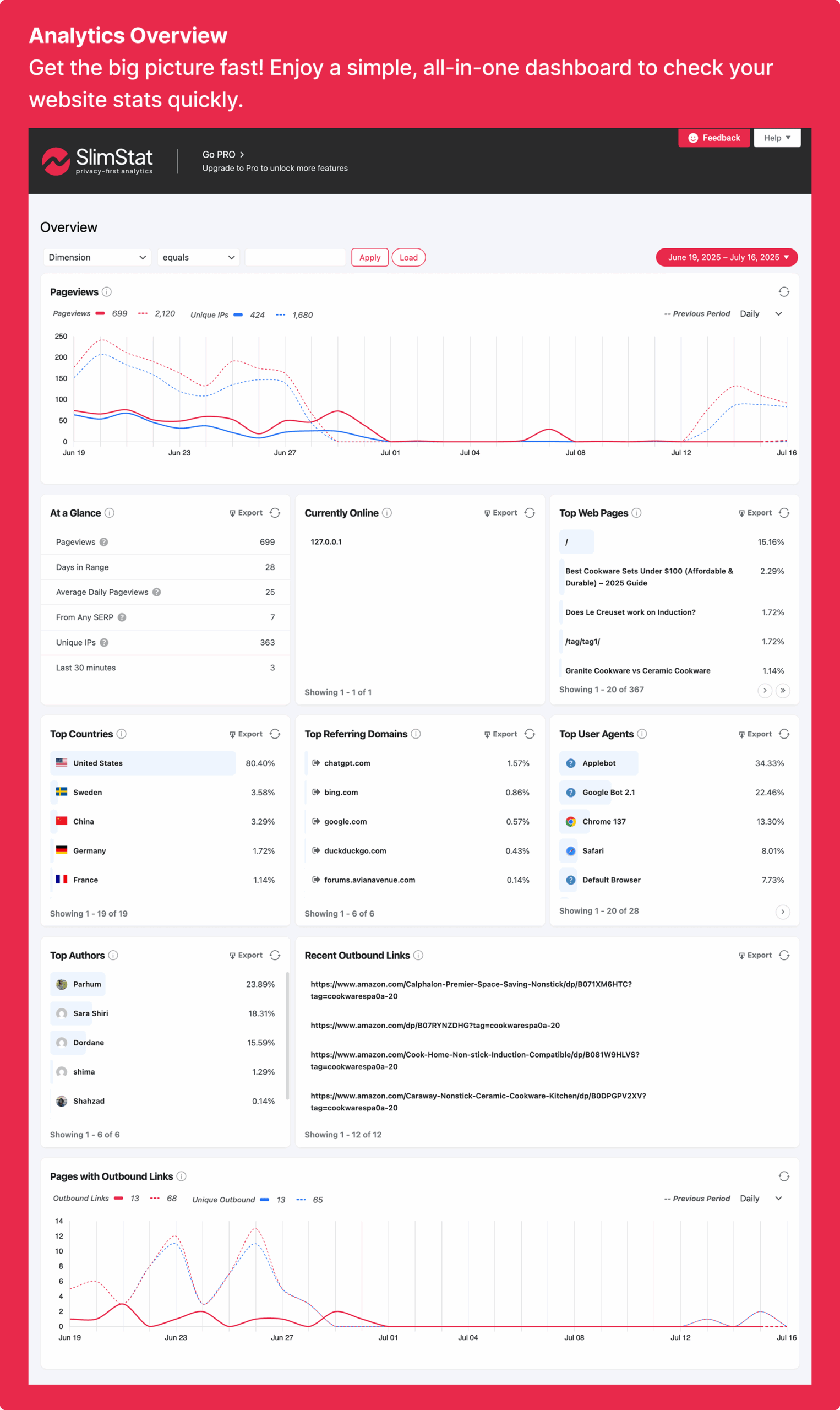
The Slimstat dashboard is accessible from the WordPress admin under SlimStat. The main dashboard is organized into a set of report widgets that can be rearranged by drag-and-drop. Unlike plugins that present a single fixed dashboard layout, Slimstat allows customization: remove widgets you do not use, reorder those you do, and configure different pages to show different report combinations.
The standard report set includes:
- Recent visitors: a live feed of current and recent sessions with country, referrer, browser, and entry page.
- Top pages: the most-viewed content in the selected date range.
- Traffic sources: referrers, search engines, social networks, and direct traffic with session counts.
- World map: geographic visitor distribution by country, rendered on an interactive map using amMap.
- Audience overview: browser, operating system, device type, and screen resolution breakdown.
- Site analysis: top categories, authors, tags, outbound links clicked, and file downloads.
The date range selector supports preset periods and custom ranges. Switching between “today,” “this week,” “this month,” or a specific date range changes all active widgets simultaneously.
The interface is noticeably more data-dense than Burst Statistics or WP Statistics. It rewards users who know which report they want to read, rather than presenting a curated summary of the most important metrics. The 5 dashboard report views available in the free version refer to 5 separately configurable dashboard “pages,” each of which can hold a different combination of widgets — effectively giving free users a custom analytics workspace rather than a single fixed screen.
Real-time access log and visitor tracking
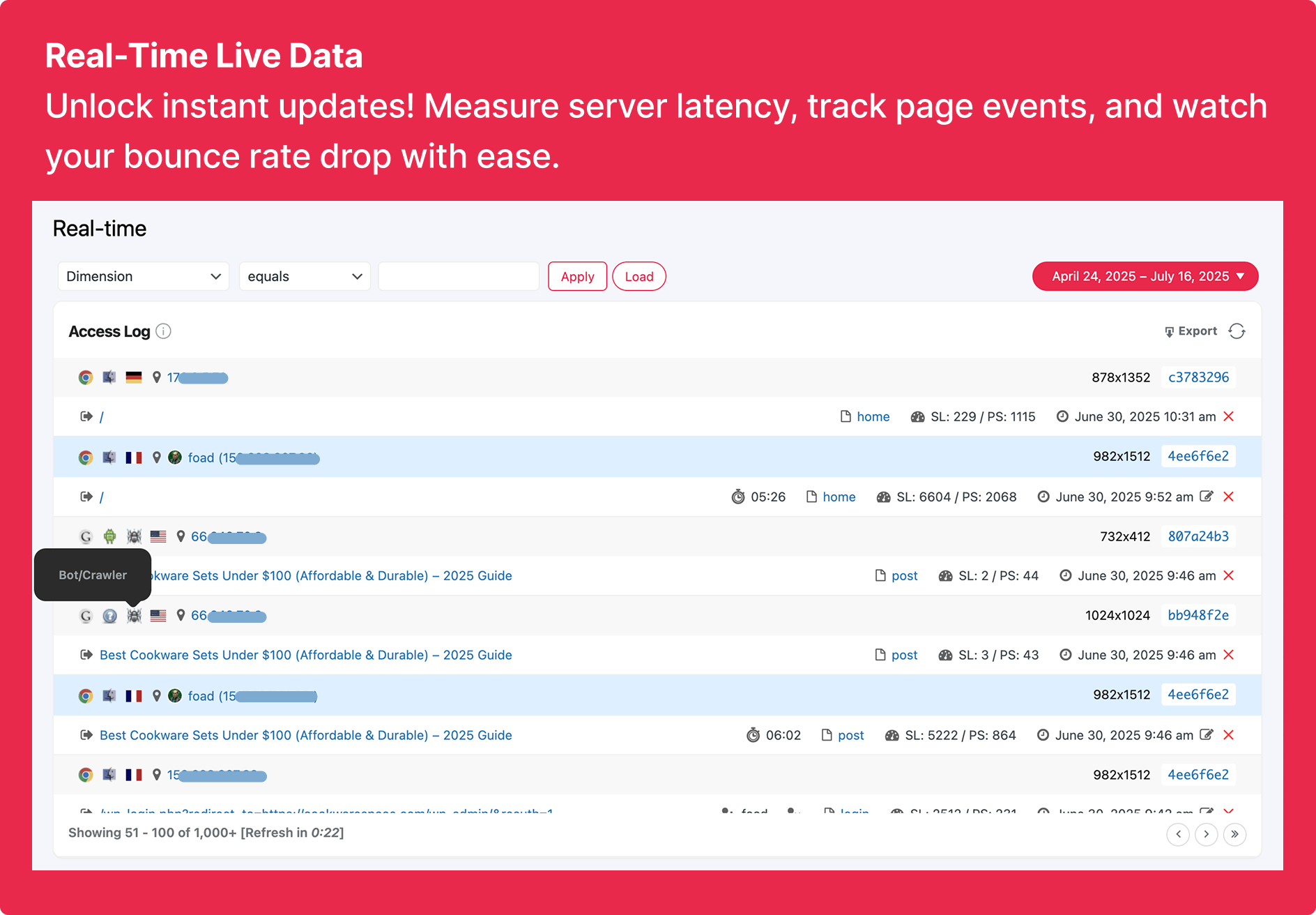
The real-time access log is the feature that most clearly separates Slimstat Analytics from every other self-hosted WordPress analytics plugin. This is not a visitor count or an aggregate metric. It is a line-by-line record of active and recent sessions, updated in real time as visitors browse the site.
Each entry in the access log shows:
- Country and city (via IP geolocation).
- Browser and operating system, with version data.
- Screen resolution.
- Referrer (where the visitor came from, including the specific referring URL).
- Entry page (the first page loaded in the session).
- Full page sequence: every page the visitor navigated to during the session, in order.
- Session duration.
- Server response time for each page load.
- Outbound link clicks recorded during the session.
For a site owner who wants to see what happened in the last hour at the session level, this access log is unlike anything available in the self-hosted analytics category. It answers questions that aggregate dashboards cannot: Did the visitor who came from that newsletter link read the whole article? Did visitors from a specific social media post visit any other pages, or bounce immediately? Is there a pattern in the pages visited by a specific referral source?
The server response time data is a practical addition for developers. Seeing a spike in server response latency on a specific page type inside the access log connects page performance problems to real visitor behavior rather than requiring a separate monitoring tool.
Geographic data and audience insights
Geographic data is included in the Slimstat free version via DB-IP Lite geolocation. This provides country and approximate city-level location without requiring an API key or external account. For most sites, DB-IP Lite is accurate enough for traffic reporting purposes.
The Pro plan adds the MaxMind API integration for enhanced geolocation accuracy, which is the industry standard for IP-to-location lookup. Pro users can configure their MaxMind API key in the plugin settings to replace DB-IP Lite with more precise location data.
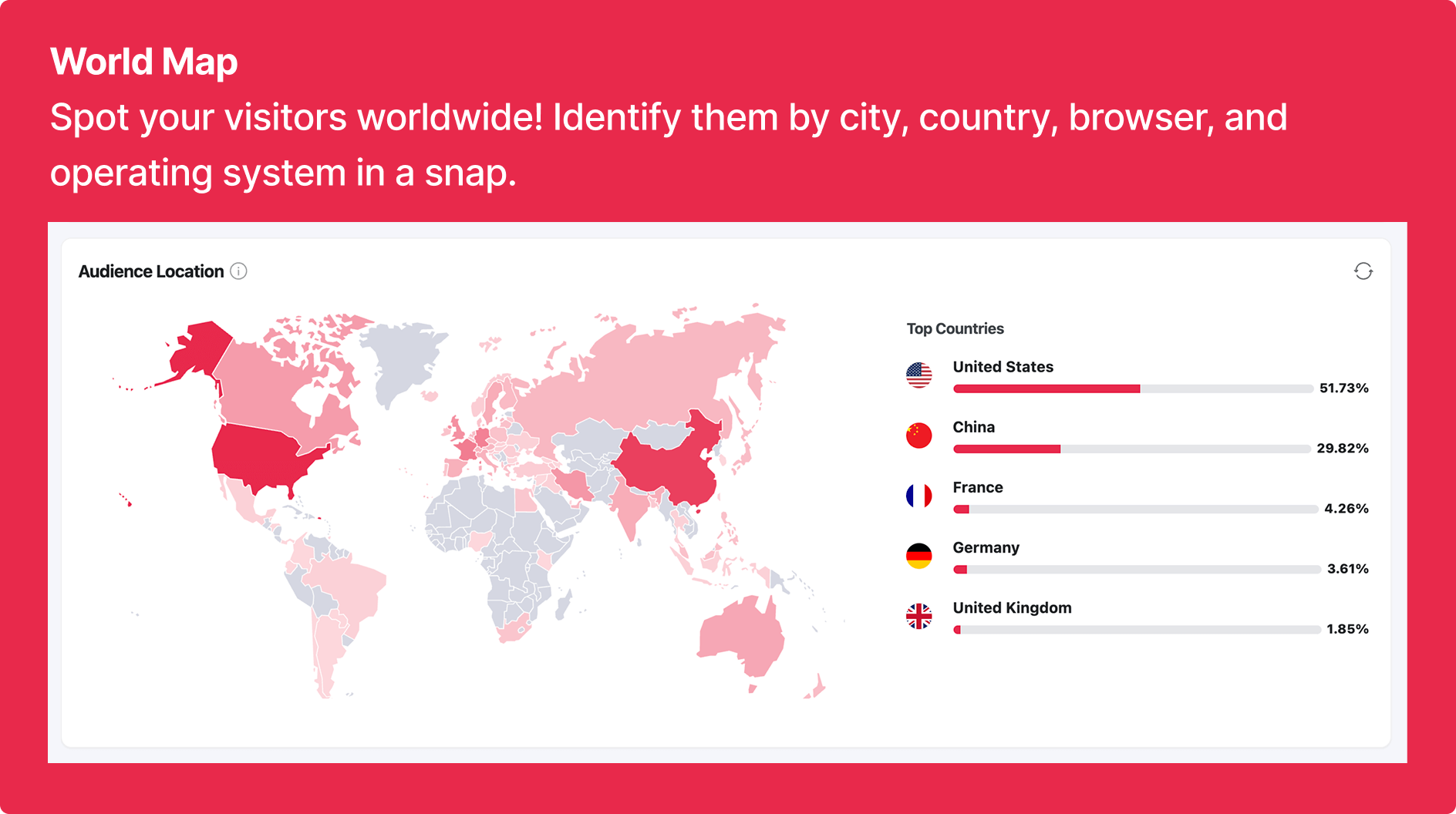
The world map widget visualizes visitor origins by country using amMap, a JavaScript mapping library. The map is interactive: hovering over a country shows the visitor count. It is a clean visualization and more visually readable than a ranked country table for identifying geographic concentration in traffic.
The audience report extends geographic data with browser (Chrome, Firefox, Safari, Edge breakdown), operating system (Windows, macOS, iOS, Android), device type (desktop, tablet, mobile), and screen resolution. For responsive design testing and optimization, the screen resolution data is particularly useful — it shows not just “mobile” but the specific screen dimensions of mobile visitors, which can inform responsive breakpoint decisions.
Goals and funnel tracking (Pro)
Goals and funnel tracking is a Pro feature that was completely redesigned in version 5.5.0 with a modern card-based interface and predefined funnel templates. Before 5.5.0, the goals system was functional but dated; the 5.5.0 redesign brought it to a level that matches current plugin design standards.
Goals in Slimstat can be configured to fire on:
- Specific page views (a thank-you page, a confirmation URL, or any specific path).
- Outbound link clicks to a defined destination.
- File download events.
The funnel builder allows site owners to define a sequence of pages that represent a conversion path — for example, a WooCommerce checkout sequence from product page to cart to payment to order confirmation. At each step in the funnel, Slimstat records how many visitors completed that step and how many exited. This surfaces drop-off points in the conversion path.
The redesigned goals interface in 5.5.0 uses a card layout that makes it easier to scan multiple active goals simultaneously and see their current conversion rates at a glance. The funnel templates accelerate configuration for common scenarios like checkout flows and lead generation funnels.
Note: Slimstat’s goals and funnels are available in Pro only. The free version does not include goal tracking. This is a meaningful limitation compared to Burst Statistics, which provides up to 3 custom goals in its free tier. For site owners who need goal tracking at zero cost, Burst Statistics free or WP Statistics free are alternatives worth evaluating.
Interactive heatmaps (Pro)
Heatmaps are a Pro feature in Slimstat Analytics. After activating the heatmap module, Slimstat records click events across your pages and renders a visual overlay showing which areas of a page receive the most interaction. The heatmap view is accessible from the Slimstat admin panel and can be applied to any tracked page URL.
The heatmap data shows where visitors click on a page: navigation links, call-to-action buttons, in-article links, sidebar elements, and areas of the page that receive clicks even without a clickable element. For layout and design optimization, this provides data that session counts and bounce rates do not.
Slimstat heatmaps are click-based, not scroll-based. They show where visitors click, not how far they scroll. This covers the primary use case for most heatmap applications (link optimization, call-to-action placement, navigation menu click distribution) but does not provide the scroll depth insights that tools like Matomo or dedicated session recording platforms offer.
Privacy and GDPR compliance
Slimstat’s privacy architecture is entirely self-hosted: all data stays in your WordPress database, with no transmission to VeronaLabs, to Google, or to any third party. The plugin’s compliance features include:
- IP address hashing by default. Visitor IP addresses are hashed before storage, meaning the database does not contain identifiable IP addresses. This satisfies the technical anonymization requirement under GDPR for analytics data.
- Do Not Track browser header support. When a visitor’s browser sends the Do Not Track (DNT) header, Slimstat respects it and does not record the visit. This is configurable: DNT compliance can be enforced or overridden in the settings.
- Data retention scheduling. Administrators can configure automatic deletion of records older than a defined period (30, 60, 90, 180 days, or custom). Scheduled deletion runs automatically.
- GDPR banner plugin integration. The documentation includes a guide for integrating Slimstat with cookie consent banner plugins. When integrated, Slimstat withholds tracking until the visitor provides consent through the banner.
- Bot and spam IP filtering. Configurable exclusion lists remove known bot IP ranges and user agents from the access log, keeping reported data clean without requiring manual log review.
One important compliance note: Slimstat does not install a cookie for tracking purposes by default. The CDN delivery feature, which is optional, adds a third-party request. With the CDN feature disabled (the default), Slimstat tracks visitors without setting browser cookies — meaning no cookie consent banner is technically required for the analytics function under the EU ePrivacy Directive. This is a meaningful compliance advantage for sites that want to minimize consent management overhead.
Email digests (Pro)
Scheduled email reports are available in the Slimstat Pro plan. After configuring the email digest settings, Slimstat sends a summary of key metrics (visitor counts, top pages, traffic sources, goal completions) to specified email addresses on a daily, weekly, or monthly schedule.
The email digest format is compact and designed to deliver a quick summary rather than a full analytics review. For site owners who do not log into WordPress frequently but want a regular traffic summary in their inbox, this is a straightforward feature that covers the essential metrics without requiring additional configuration beyond the schedule and recipient email addresses.
Network analytics (Pro)
WordPress multisite network operators can use Slimstat Pro’s network analytics feature to consolidate analytics from all subsites into a single view at the network level. This is useful for university networks, agency installations running multiple client sites on the same WordPress multisite, or any network where consolidated traffic reporting matters.
Each subsite also retains its own analytics dashboard with site-level data. Network analytics adds the consolidated view on top of individual site reporting, not instead of it.
Pricing and license value
Slimstat Analytics is free on WordPress.org with no pageview or visitor caps. The Pro plan is available from wp-slimstat.com with a 14-day money-back guarantee. All pricing is annual. Pricing verified August 20, 2026.
Current pricing
Pro 1 Site: $29/year (promotional through August 31, 2026; regular $39/year). All Pro features: email digests, goals and funnels, heatmaps, custom database, advanced data export, user activity profiles, advanced Whois, and network analytics for 1 site.
5-Site and Unlimited licenses: available at current pricing on wp-slimstat.com/pricing/. The unlimited license is the practical choice for agencies managing analytics across multiple client deployments.
How Slimstat compares on pricing
Against WP Statistics: WP Statistics includes geographic data, unlimited goals, and a comparable self-hosted architecture in its free tier. The paid Premium tier of WP Statistics starts significantly above Slimstat Pro’s $29-39/year entry. Slimstat Pro’s heatmap feature distinguishes it from WP Statistics at any paid tier. See our WP Statistics review for a detailed breakdown.
Against Burst Statistics: Burst Statistics free includes up to 3 custom goals, which Slimstat free does not. Burst Pro Creator at $49/year for geographic data and UTM tracking costs more than Slimstat Pro at $29/year. Slimstat’s real-time access log depth exceeds what Burst Statistics provides. The choice between them depends on whether you prioritize interface simplicity and UTM tracking (Burst) or real-time session-level detail and heatmaps (Slimstat). See our Burst Statistics review for a full comparison.
Against MonsterInsights and Analytify: these are entirely different product categories. Both connect to Google Analytics 4 and send data to Google’s servers. Slimstat has no Google integration and stores all data locally. If you want GA4 reports inside WordPress, MonsterInsights or Analytify are the correct tools. If you want server-side, self-hosted analytics, Slimstat is the correct tool.
Against Matomo for WordPress: Matomo’s open-source self-hosted version includes heatmaps, session recordings, form analytics, A/B testing, and full eCommerce tracking in a more complex deployment. For organizations that need the full analytics program, Matomo is deeper. For sites that want self-hosted visitor tracking with a real-time access log and reasonable setup overhead, Slimstat is meaningfully simpler to operate on a standard WordPress hosting environment.
Pros and cons
Pros
- The deepest real-time access log in the self-hosted WordPress analytics category. Individual visitor sessions recorded with country, browser, referrer, page sequence, and server response time.
- 16 years of active development since April 2010, maintained through multiple major WordPress versions and privacy regulatory changes.
- 4.8/5 stars from 816 reviews — high satisfaction across a substantial review sample.
- Geographic data (country and city) included in the free version via DB-IP Lite — no API key required. Matches WP Statistics and is a genuine advantage over Burst Statistics.
- No cookie tracking by default. With the CDN feature disabled, Slimstat tracks visitors without setting a browser cookie. No consent banner is legally required for the analytics function under EU ePrivacy rules.
- Fully self-hosted. All data stays in your WordPress database, satisfying data sovereignty and GDPR requirements at the architecture level.
- Customizable multi-page dashboard: 5 separately configurable dashboard pages let power users build a tailored analytics workspace.
- Dynamic shortcodes embed specific report widgets into any page, post, or sidebar.
- Pro plan at $29-39/year is among the lowest-priced paid tiers in the self-hosted analytics category, including heatmaps and email digests.
- Goals and funnels completely redesigned in 5.5.0 with modern card-based UI and funnel templates.
- Cache plugin compatibility with W3 Total Cache, WP SuperCache, and CloudFlare out of the box.
Cons
- Interface complexity is higher than most lightweight alternatives. Slimstat can feel overwhelming for site owners who want a simple “top metrics” view.
- No goal tracking in the free version. Burst Statistics provides 3 custom goals free; WP Statistics offers unlimited free goals. Slimstat gates all goal configuration behind the Pro plan.
- No WooCommerce revenue or eCommerce tracking in any plan. Store operators who need revenue attribution, cart abandonment data, or order-level analytics need a different tool.
- Database growth on high-traffic sites requires proactive management. Without a configured data retention period, the Slimstat database tables grow indefinitely.
- Version 5.4.x introduced tracking failures and 503 errors for some installations. The 5.4.2 patch and subsequent 5.5.0 release addressed these, but the instability raised concerns.
- 70,000 active installs is smaller than WP Statistics (600,000+) and Burst Statistics (200,000+). Fewer community tutorials and third-party integrations exist.
- No UTM campaign tracking in any plan. Sites running paid advertising cannot attribute conversions to specific UTM sources within Slimstat.
- Heatmaps are click-only, not scroll depth. For content optimization requiring scroll behavior data, a separate tool is needed.
- No Search Console integration. Keyword-level organic search data is not surfaced inside the Slimstat dashboard.
Alternatives to Slimstat Analytics
- WP Statistics. The most-installed self-hosted analytics plugin for WordPress at 600,000+ active installs. WP Statistics includes geographic data and unlimited custom goals in its free tier, which Slimstat does not. WP Statistics does not have a real-time access log at the individual session level. Its interface is broader and covers more aggregate metrics. The WP Statistics Premium tier starts at a higher price than Slimstat Pro.
- Burst Statistics. A newer, simpler privacy-first WordPress analytics plugin at 200,000+ installs with a 4.9-star rating. Burst prioritizes a clean aggregate dashboard over detailed session logs. The free version includes 3 custom goals (Slimstat free does not). Geographic data requires the $49/year Creator plan (Slimstat free includes it). Burst is the better choice for site owners who want simple, clean traffic reports. Slimstat is the better choice for site owners who want session-level visibility.
- Matomo for WordPress. The open-source self-hosted analytics platform that most directly competes with Slimstat on feature depth. Matomo includes heatmaps, session recordings, form analytics, A/B testing, eCommerce tracking, and SEO reports in a single self-hosted deployment. Matomo is more complex to configure and resource-intensive on shared hosting than Slimstat. For sites that need enterprise-level analytics depth without Google, Matomo is the comprehensive option.
- MonsterInsights. The most-installed WordPress GA4 dashboard plugin. Connects to Google Analytics 4. Sends data to Google’s servers. Not a self-hosted option. The right tool when GA4 is the analytics standard and you want its data inside WordPress.
- Analytify. A WordPress GA4 connector competing with MonsterInsights on price. Requires a Google Analytics 4 account. Not a privacy-first, self-hosted option.
- Site Kit by Google. The official free Google plugin connecting WordPress to GA4, Search Console, PageSpeed Insights, and AdSense. Zero cost but sends all data to Google. The opposite end of the data ownership spectrum from Slimstat.
- Plausible Analytics. A SaaS-based privacy-first analytics platform. Privacy positioning similar to Slimstat but data is stored on Plausible’s servers rather than your own WordPress database. Starts at $9/month. Simpler aggregate dashboards; no session-level access log.
Final verdict
Slimstat Analytics has earned its 4.8-star average across 16 years of user reviews by doing one thing better than any competing self-hosted WordPress analytics plugin: showing you exactly what visitors are doing on your site, in real time, at the individual session level.
For the site owner who wants to know which specific links brought traffic in the last hour, watch a newsletter launch in real time as subscriber sessions appear in the access log, or trace the behavior of visitors from a particular referrer through their page sequence, Slimstat is the only self-hosted option that provides this without additional configuration or a paid tier.
The free version is complete for that use case: real-time access log, geographic data, traffic sources, content analysis, outbound link tracking, and a customizable dashboard with no account required and no visitor limits. The $29/year Pro plan adds heatmaps, email digests, and the redesigned goals and funnels system from version 5.5.0 — all at a price that is lower than the comparable paid tier of any direct competitor.
The honest assessment of who should not use it: site owners who want simplicity above all else will find Burst Statistics or WP Statistics more immediately accessible. Store operators who need WooCommerce revenue tracking will need to combine Slimstat with a dedicated eCommerce analytics tool. Sites that need UTM campaign attribution built into their analytics will find that gap meaningful.
The version 5.4.x instability is worth noting for any buyer evaluating the plugin today. Those issues were resolved in 5.4.2 and 5.5.0, and the 5.5.0 release is the strongest Slimstat has been in recent memory. But the episode is a reminder that a plugin maintained by a small team carries some dependency risk that larger-team alternatives partially mitigate.
For the specific audience Slimstat serves — the WordPress publisher, researcher, or developer who wants to see exactly what visitors do on their site — there is no better self-hosted option available at any price. That has been true since 2010, and version 5.5.0 keeps it true in 2026.
FAQ
Is Slimstat Analytics free?
Yes. Slimstat Analytics is published on WordPress.org at no cost with no pageview or visitor limits and no account required. The free version includes real-time access log tracking, geographic data (country and city level via DB-IP Lite), traffic source analysis, content performance by page, category, and author, outbound link and file download tracking, a customizable multi-page dashboard, CSV data export, bot filtering, IP address hashing for GDPR compliance, and Do Not Track browser header support. The Pro plan at $29-39/year per site adds heatmaps, email digests, goals and funnels, user activity profiles, and network analytics.
Who makes Slimstat Analytics?
Slimstat Analytics is developed by VeronaLabs, a development team based in Tallinn, Estonia. The plugin was first published to WordPress.org in April 2010 and has been continuously maintained since. VeronaLabs is a small, focused team — Slimstat is their primary WordPress product. The plugin’s 16-year history and consistent update record across major WordPress version changes indicate a stable maintenance commitment.
Does Slimstat Analytics use cookies?
Not by default. Slimstat tracks visitors server-side without placing browser cookies when the CDN delivery feature is disabled, which is the default configuration. This means no cookie consent banner is technically required for the analytics tracking function under the EU ePrivacy Directive. If you enable the optional CDN feature for tracking script delivery, a third-party request is added. Most privacy-first deployments keep the CDN feature disabled.
Is Slimstat Analytics GDPR-compliant?
Yes, subject to configuration. All visitor data is stored in your own WordPress database. No data is transmitted to VeronaLabs or any third party. IP addresses are hashed before storage by default, meaning the database does not contain identifiable IP addresses. Slimstat respects Do Not Track browser headers, supports configurable data retention with scheduled automatic deletion, and integrates with cookie consent banner plugins to withhold tracking until visitor consent is obtained. As with any analytics implementation, formal legal compliance in specific jurisdictions should be verified with legal counsel.
What does Slimstat Pro add over the free version?
The Pro plan adds: interactive heatmaps (visual click maps for any tracked page), scheduled email digests (daily/weekly/monthly reports delivered to your inbox), goals and funnel tracking (redesigned in version 5.5.0 with modern card layouts and funnel templates), user activity profiles (detailed session history for registered WordPress users), enhanced geolocation via MaxMind API, custom database configuration, advanced data export, advanced Whois lookup, and network analytics for WordPress multisite installations. Pro costs $29/year for 1 site (promotional rate through August 31, 2026; regular price $39/year).
How does Slimstat Analytics compare to WP Statistics?
Both plugins are self-hosted, privacy-first, and store all data in your WordPress database. Both include geographic data in the free version. WP Statistics has significantly more active installs (600,000+ vs 70,000+), a larger community, and unlimited custom goals in its free tier, which Slimstat does not provide at zero cost. Slimstat’s distinctive advantage is the real-time access log: a per-session, individual visitor record that shows every page in sequence, browser, referrer, and server response time. For detailed visitor-level investigation, Slimstat is the better tool. For a larger community and free goal tracking, WP Statistics is the better choice. See our WP Statistics review.
How does Slimstat compare to Matomo for WordPress?
Matomo for WordPress is an open-source self-hosted analytics platform with a broader feature set: heatmaps, session recordings, form analytics, A/B testing, eCommerce tracking, and marketing attribution. Matomo is more resource-intensive and more complex to configure than Slimstat. On standard shared WordPress hosting, Matomo can have performance implications that Slimstat does not. For organizations that need the full enterprise analytics stack self-hosted, Matomo is the right tool. For sites that want detailed visitor tracking with real-time session visibility at lower operational complexity, Slimstat is the better fit.
Does Slimstat Analytics slow down my WordPress site?
Slimstat injects a small tracking script into your WordPress frontend to capture client-side events like outbound link clicks. The core session tracking is server-side. The plugin is designed for compatibility with major cache plugins (W3 Total Cache, WP Super Cache, CloudFlare) to maintain tracking accuracy alongside aggressive caching. The main performance consideration is database size on high-traffic sites: without a configured data retention period, large Slimstat database tables can add overhead to database-heavy operations. Setting a retention schedule (90-180 days for most sites) keeps this manageable.
Can I track WooCommerce with Slimstat Analytics?
Partially. Slimstat tracks pageviews of WooCommerce product pages, category pages, and the checkout sequence in the access log and content performance reports. You can monitor funnel drop-off by configuring goals against specific checkout step URLs in the Pro plan. What Slimstat does not provide is native WooCommerce revenue reporting: total sales revenue, average order value, conversion rate tied to order data, or cart abandonment attribution at the order level. For those metrics, Burst Statistics Pro Business ($99/year) or a GA4 connector like MonsterInsights Pro are the correct tools.
What is the real-time access log and why does it matter?
The real-time access log is Slimstat’s defining feature. Rather than showing only aggregate metrics (total visitors, total pageviews), the access log displays individual visitor sessions as they happen: the visitor’s country, browser, referrer, entry page, every page they navigate to in sequence, and how long they spend. For publishers watching the effect of a social media post, developers tracing bot activity, or any site owner who wants to understand what specific visitors actually do rather than what all visitors do in aggregate, this level of session detail is not available in any other self-hosted WordPress analytics plugin. It is the feature that has kept Slimstat in active deployment for 16 years among users who have tried newer alternatives and returned.
Does Slimstat Analytics work with WordPress multisite?
Yes. The Pro plan includes network analytics for WordPress multisite installations. After activating Slimstat on a multisite network, site administrators can view analytics for their individual site. Network administrators with the Pro license can view a consolidated analytics overview across all subsites in the network. Individual site-level dashboards remain available alongside the network-level view.