

One million organisations worldwide. That is the number Matomo publishes as its global user base across all deployment types, a figure that spans WordPress site owners, government agencies, and enterprises running fully self-managed analytics on their own infrastructure. The WordPress plugin specifically has crossed 100,000 active installs with a 4.6-star rating from 177 reviews, a meaningful position in a self-hosted analytics category where most plugins are lucky to hold 70,000 installs.
Matomo Analytics is an open-source analytics platform that started as Piwik in 2007, renamed to Matomo in 2018, and has since grown into one of the most feature-complete Google Analytics alternatives available. For WordPress users, the plugin (titled “Matomo Analytics: Powerful, Privacy-First Insights for WordPress”) bundles a standalone Matomo installation directly into your WordPress site: no separate server, no external account, and no tracking code to copy from an analytics dashboard. This review covers version 5.12.1, tested up to WordPress 7.0.4, with pricing verified August 21, 2026. I worked through the Matomo website, pricing page, WordPress.org plugin listing and changelog, the FAQ documentation, and public user reviews across review platforms. Where premium add-on features were not directly accessible for testing, those sections say so clearly.
At a glance
Audited on: matomo.org product and pricing pages; WordPress.org plugin listing (version 5.12.1, 100,000+ active installs, 4.6/5 stars from 177 reviews, tested up to WordPress 7.0.4); plugin changelog and FAQ documentation. Pricing checked August 21, 2026.
Free tier (WordPress plugin): full self-hosted analytics on your WordPress database, real-time visitor tracking, geolocation reports (via DB-IP Lite), ecommerce tracking (WooCommerce, Easy Digital Downloads, MemberPress), campaign and conversion goal tracking, Tag Manager integration, custom dashboards with drag-and-drop widgets, visitor segmentation, JavaScript error tracking, user access management, GDPR compliance tools (IP anonymization, data retention controls, cookieless tracking mode), import from Google Analytics and WP Statistics.
Premium add-ons: purchased separately from the Matomo marketplace. Heatmaps and Session Recording (~219 EUR/year), Form Analytics (~169 EUR/year), Funnels (~193 EUR/year), Media Analytics (~176 EUR/year), A/B Testing (~219 EUR/year), Custom Reports (~219 EUR/year), WooCommerce Analytics (~39 EUR/year), Cohorts (~94 EUR/year), Users Flow (~94 EUR/year), Activity Log (~33 EUR/year), Roll-Up Reporting, SEO Web Vitals, and others. 30-day free trial per add-on.
Matomo Cloud (alternative to the WordPress plugin): Starter at $29/month for 50,000 monthly hits (21-day free trial, no credit card required). Business and Enterprise tiers require a sales conversation.
Bottom line: the most feature-complete self-hosted analytics plugin for WordPress, with no data sent to Google and full ownership of every visitor record. Heatmaps, funnels, session recordings, A/B testing, and form analytics are all available as separate add-ons, making Matomo the closest self-hosted equivalent to a full enterprise analytics stack. The honest trade-off: it is the most complex plugin in this category to configure and maintain, has higher server resource requirements than competitors, and accumulates cost quickly once premium add-ons enter the picture.


Quick verdict
Matomo Analytics occupies a unique position in the WordPress analytics category. It is the only self-hosted plugin that delivers a feature set genuinely comparable to a full enterprise analytics stack: visitor tracking, ecommerce reports, Tag Manager, segmentation, conversion funnels, heatmaps, session recordings, A/B testing, and form analytics, all running on your own WordPress server with no data leaving your infrastructure. No other plugin in this category offers this breadth in a single package.
The free version alone covers more than most site owners will ever need. Real-time visitor tracking, full geolocation data, ecommerce reporting for WooCommerce stores, campaign and goal tracking, custom dashboards, and GDPR compliance tools are included without creating a Google account, signing up for an external service, or paying a recurring fee. For privacy-conscious site owners who need comprehensive analytics without a third-party data dependency, the free WordPress plugin is a complete solution.
The complication appears when you compare Matomo to simpler alternatives. Burst Statistics or WP Statistics install and show useful data within two minutes. Matomo requires more configuration, demands more server resources, and presents more reports than many site owners need. For a personal blog or a small business site that just wants to know which pages are popular and where visitors are coming from, the complexity overhead is not worth it.
Where Matomo is definitively the right tool: organizations where sending visitor data to Google is legally or contractually restricted, enterprises that need a full analytics stack without cloud vendor lock-in, and site owners who want the depth of GA4 plus heatmaps and session recordings on a single privacy-compliant platform.
Quick verdict
Best for: organizations with GDPR, HIPAA, or data sovereignty requirements that prohibit sending analytics data to Google; WordPress site owners who need heatmaps, session recordings, and conversion funnels without additional SaaS subscriptions; technical WordPress users comfortable maintaining a self-hosted analytics instance; EU/EEA businesses with strict data residency requirements.
Best plan for single sites: the free WordPress plugin covers everything a standard site needs. Add the WooCommerce Analytics add-on (~39 EUR/year) if ecommerce funnel depth matters. Add Heatmaps and Session Recording (~219 EUR/year) only if you are actively doing conversion rate optimization.
Best plan for high-traffic or multi-site operations: Matomo Cloud Starter at $29/month eliminates the server maintenance burden and scales automatically. For agencies managing many client sites, Roll-Up Reporting consolidates all properties into one dashboard.
Standout: the only self-hosted WordPress analytics plugin with native heatmaps, session recordings, A/B testing, and form analytics available as add-ons; full ecommerce tracking including WooCommerce, Easy Digital Downloads, and MemberPress in the free version; Google Analytics and WP Statistics import for history migration; ISO 27001:2022 certified; open-source core with transparent data handling.
Watch out for: higher server resource requirements than any competing plugin (128MB minimum, 256MB recommended); not recommended for high-traffic sites without upgrading hosting; Tag Manager does not work in WordPress Multisite mode; premium add-on costs accumulate quickly; steeper configuration curve than Burst Statistics or WP Statistics; no AI analytics features.
What Matomo is
Matomo Analytics began as Piwik in 2007, created by Matthieu Aubry as an open-source alternative to Google Analytics. After years of growth as the world’s most widely installed self-hosted analytics platform, the project renamed to Matomo in January 2018. Today the platform is developed and maintained by InnoCraft Ltd, a New Zealand-headquartered company with team members across Europe and beyond.
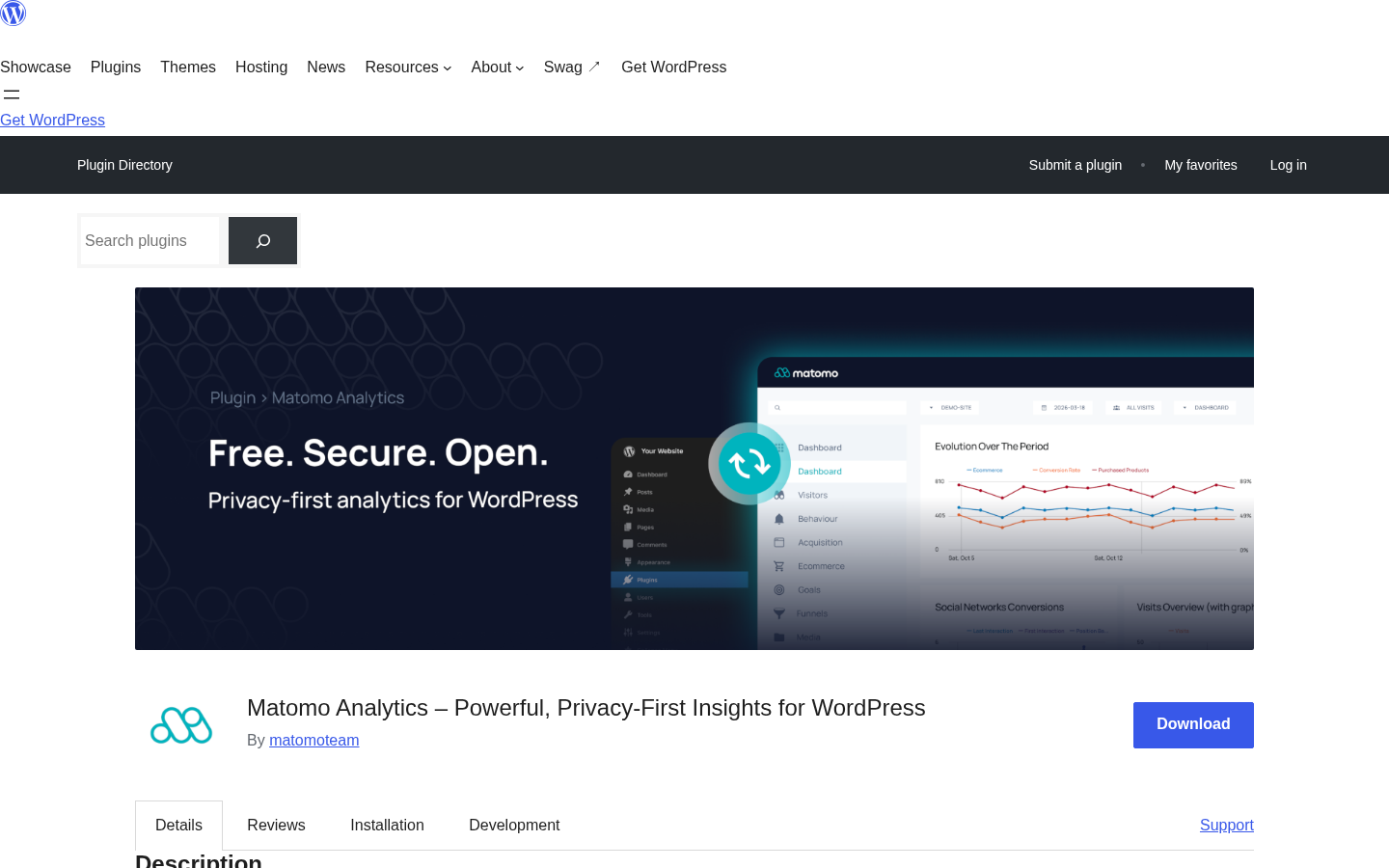
The WordPress plugin (“Matomo Analytics: Powerful, Privacy-First Insights for WordPress”) is a packaged version of the Matomo software installed directly within your WordPress environment. When you activate the plugin, Matomo creates its own database tables inside your WordPress MySQL database and begins operating as a self-contained analytics instance. Unlike GA4 connector plugins (MonsterInsights, Analytify, ExactMetrics), which read from Google’s servers and display that data in WordPress, Matomo stores all data locally. Unlike simpler self-hosted plugins (Burst Statistics, WP Statistics), which offer focused dashboards, Matomo presents the full analytics feature set from the standalone Matomo platform.
The global install base matters here. Matomo claims one million organisations worldwide, a figure reflecting deployments across all installation types: the WordPress plugin, standalone on-premise installations, Matomo Cloud subscribers, and enterprise customers. Independent review aggregators show a 4.7/5 average across Capterra, G2, GetApp, and Software Advice, consistent with the 4.6/5 rating on WordPress.org.
On WordPress.org, the plugin shows 100,000+ active installs from 177 reviews (148 five-star, 10 four-star, 6 three-star, 1 two-star, 12 one-star) as of August 2026. That install base is smaller than WP Statistics (600,000+) or Burst Statistics (200,000+) but larger than Slimstat Analytics (70,000+). Matomo’s is the largest feature set in the category; the lower relative install count likely reflects the higher resource requirements and configuration complexity that filter out casual users.
Who Matomo is best for
Strong fit
- Organizations operating under legal or contractual data protection requirements that restrict sending visitor data to US-based cloud services. The EU Schrems II framework, GDPR Article 44-49, and HIPAA have all driven organizations to Matomo as a compliant alternative to Google Analytics.
- WordPress site owners who need the analytics depth of GA4 (funnels, segmentation, ecommerce attribution, custom events) without a Google dependency. Matomo replicates this feature set on your own infrastructure.
- WooCommerce store operators who need ecommerce analytics (product performance, sales funnel, conversion rates, revenue attribution) without sending order data to Google’s servers. Matomo’s ecommerce module covers WooCommerce out of the box in the free plugin.
- Technical WordPress users comfortable configuring a self-hosted analytics instance, managing database growth, and maintaining plugin updates. Matomo rewards technical investment with depth that simpler plugins cannot match.
- Site owners migrating away from Google Analytics who want to bring historical data with them. Matomo includes a Google Analytics import feature that pulls historical GA4 data into your Matomo instance.
- Multi-author publishers and content teams that need per-author analytics, per-segment dashboards, and role-based access control. Matomo’s user management system supports granular WordPress-based permissions.
- Enterprises that need A/B testing, multivariate testing, session recordings, and form analytics without subscribing to separate SaaS tools. These capabilities are available as add-ons in the same Matomo environment.
Weak fit
- Non-technical site owners who want analytics running with minimal configuration. Burst Statistics or WP Statistics will show useful data far faster with far less friction.
- Sites on shared hosting with 128MB or less PHP memory. Matomo’s minimum requirement is 128MB; the FAQ recommends 256MB. Many shared hosting plans run at 64-128MB by default.
- High-traffic WordPress sites above a threshold the plugin describes as “substantial traffic.” The FAQ explicitly recommends Matomo Cloud or standalone On-Premise for these use cases.
- Site owners who want Google Analytics 4 data surfaced inside WordPress. Matomo is a GA4 replacement, not a GA4 connector. If your team reports from GA4, MonsterInsights or Analytify serve that need.
- WordPress Multisite administrators who need Tag Manager across all network sites. The FAQ notes that Tag Manager does not work in Multisite mode. This is a documented limitation with no current resolution.
- Organizations that need AI-powered analytics queries or natural language reporting. Matomo does not offer this. MonsterInsights’ Charlie Chat covers this use case if AI analytics is a priority.
Setting up Matomo for WordPress
Installation follows the standard WordPress plugin route: Plugins, Add New, search “Matomo Analytics,” install, and activate. After activation, the plugin prompts you to navigate to Matomo Analytics in the left menu and click “Activate tracking” on the Get Started page.
What happens under the hood is more involved than simpler analytics plugins. Matomo creates its own set of database tables inside your WordPress MySQL database, downloads a geolocation database from DB-IP upon first activation (used for geographic reports without requiring a separate API key), and sets up a self-contained PHP application embedded within WordPress. The setup process works without developer involvement for standard WordPress installations, but it differs meaningfully from activating Burst Statistics, where you click and immediately see data.
The settings panel is accessible from the WordPress admin under Matomo. Key configuration areas I checked:
- Tracking settings. Toggle cookieless tracking (which Matomo calls “without cookies” mode, relying on a first-party approach that does not trigger consent requirements), or use the standard cookie-based tracking for higher accuracy. Tracking exclusions let you filter logged-in users, specific roles, IP ranges, and user agents to prevent internal traffic from skewing data.
- Privacy and GDPR settings. IP anonymization is configurable at the two-octet or three-octet level. Data retention periods can be set to automatically purge raw visitor logs after a defined interval. The “Do Not Track” browser signal can be honored. Data Subject Request handling tools provide a search interface to find and delete records associated with a specific user, fulfilling a GDPR deletion requirement without manual database queries.
- User management. Matomo integrates with WordPress roles. You can grant specific WordPress users view or admin access to Matomo reports without giving them WordPress admin privileges, which is useful for client reporting or team members who need analytics access without site access.
- Site configuration. The plugin can track multiple sites (if you have a WordPress Multisite or want to add additional non-WordPress domains), with each site receiving its own tracking ID and reports.
The minimum requirements listed in the FAQ: PHP 7.2 or higher, MySQL 5.5 or higher, and 128MB PHP memory (256MB recommended). Sites on shared hosting with limited memory allocations are the most common source of activation and performance issues. Confirming your host’s PHP memory limit before installing Matomo is a practical first step.
Dashboard and main reports
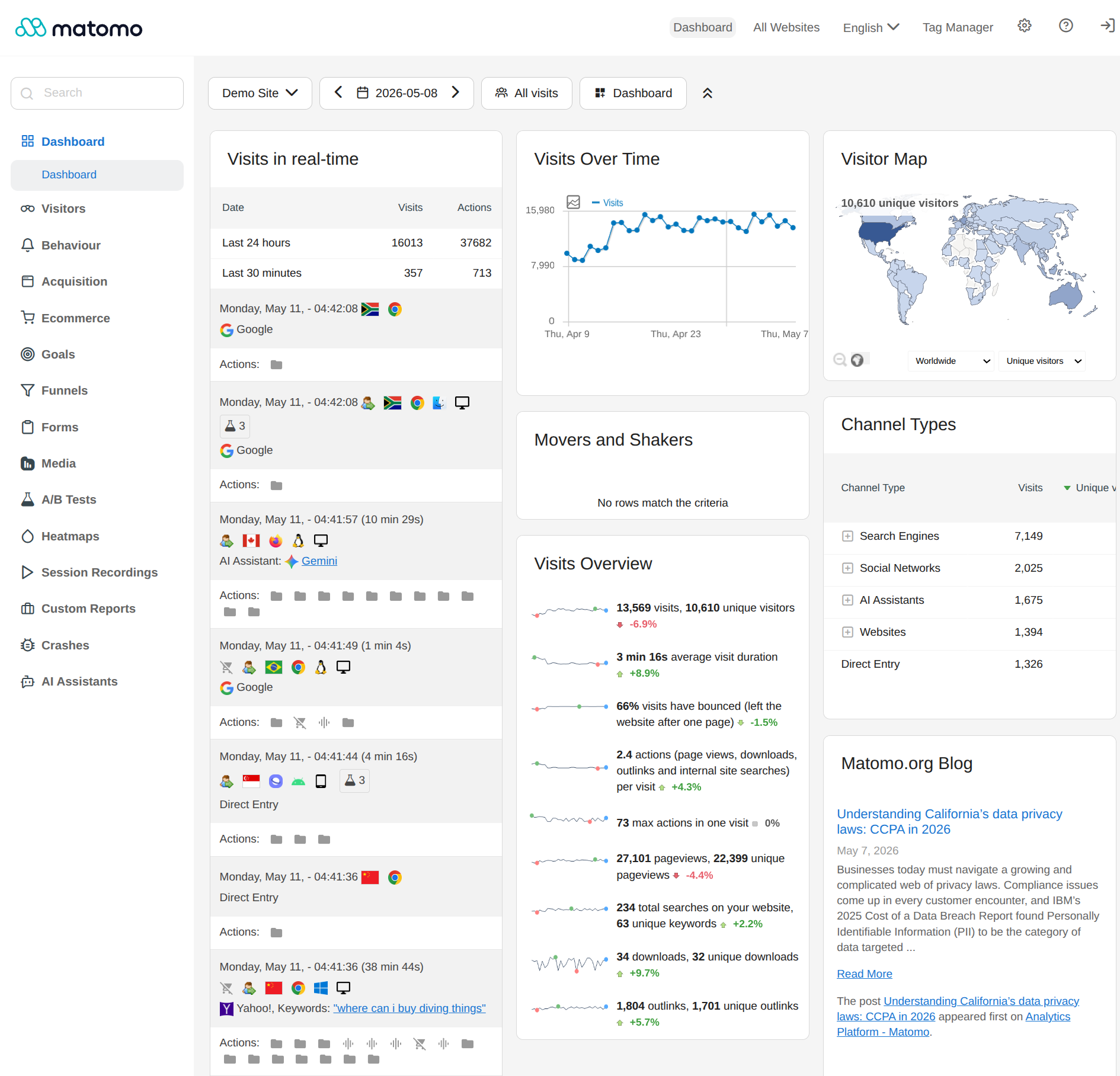
The Matomo dashboard inside WordPress organizes analytics into a tabbed navigation structure covering Visitors, Behaviour, Acquisition, Ecommerce, and Goals. The interface is the full Matomo analytics application rendered inside the WordPress admin, not a simplified summary view.
The overview dashboard is customizable: Matomo uses a widget system where you choose which report blocks to display and arrange them by dragging and dropping. The default configuration shows:
- Visits summary (visitors, pageviews, bounce rate, average session duration, pages per session) over the selected date range.
- Real-time visitor map showing currently active visitors by country.
- Visits over time as a line or bar chart.
- Top pages by pageview count.
- Traffic sources (referrers, direct, search engines, campaigns) by visit count.
- Device type and browser breakdown.
Date range selection offers presets (today, yesterday, week, month, year) and a calendar picker for custom ranges. Comparison mode allows setting two periods side by side. Data can be exported to CSV, XML, JSON, or PDF from any report view, a standard Matomo feature not available in simpler plugins.
The Visitors section contains the most granular individual session data: a real-time visitor log, visitor profiles (a full history of all visits from an individual using a persistent identifier), geographic reports by country, region, and city, device type and resolution breakdowns, and browser reports. The Behaviour section covers content performance: pages by pageview, entry and exit pages, page titles, time on page, outlinks, file downloads, and internal site search. The Acquisition section breaks down traffic by source: referrer sites, search engines, campaigns (UTM parameters), and social networks.
GDPR and privacy compliance
Privacy compliance is Matomo’s strongest product positioning, and it is backed by architecture rather than just marketing. Because all data is stored in your WordPress database with no third-party data transmission, Matomo eliminates the Schrems II problem at its root: there is no data transfer to Google’s US-based servers, because the data never leaves your server.
The specific compliance tools I found in the settings panel:
- IP anonymization (configured at two or three octets, removing the identifying last portion of the IP address before storage).
- “Without cookies” tracking mode. When enabled, Matomo derives visitor identification from a first-party approach without placing browser cookies, meaning no ePrivacy Directive cookie consent requirement is triggered for the analytics tracking itself.
- Do Not Track browser signal support (optional; when enabled, Matomo does not track visitors who have set the DNT header in their browser).
- Data retention controls with automatic purge scheduling.
- Data Subject Request tools for finding and permanently deleting all records associated with a specific user, as required under GDPR Article 17 (right to erasure).
The “without cookies” mode is the most significant compliance feature for EU/EEA sites. Under the EU ePrivacy Directive and its national implementations in Germany, France, the Netherlands, and others, analytics cookies that track personal behavior require prior consent. Matomo’s cookieless mode avoids placing these cookies entirely, which the CNIL (France’s data protection authority) and the German Datenschutzkonferenz have previously recognized as a consent-exempt tracking approach when configured with appropriate anonymization settings.
Matomo is ISO 27001:2022 certified, which covers both the company’s processes and the Matomo Cloud infrastructure. The caveat that applies regardless of which privacy settings are configured: legal compliance with GDPR, HIPAA, or Schrems II is a complex question involving jurisdiction, specific data flows, and organizational policies. Matomo’s architecture supports a strong compliance posture, but formal compliance validation for high-stakes deployments should involve legal counsel familiar with the relevant frameworks.
Ecommerce tracking
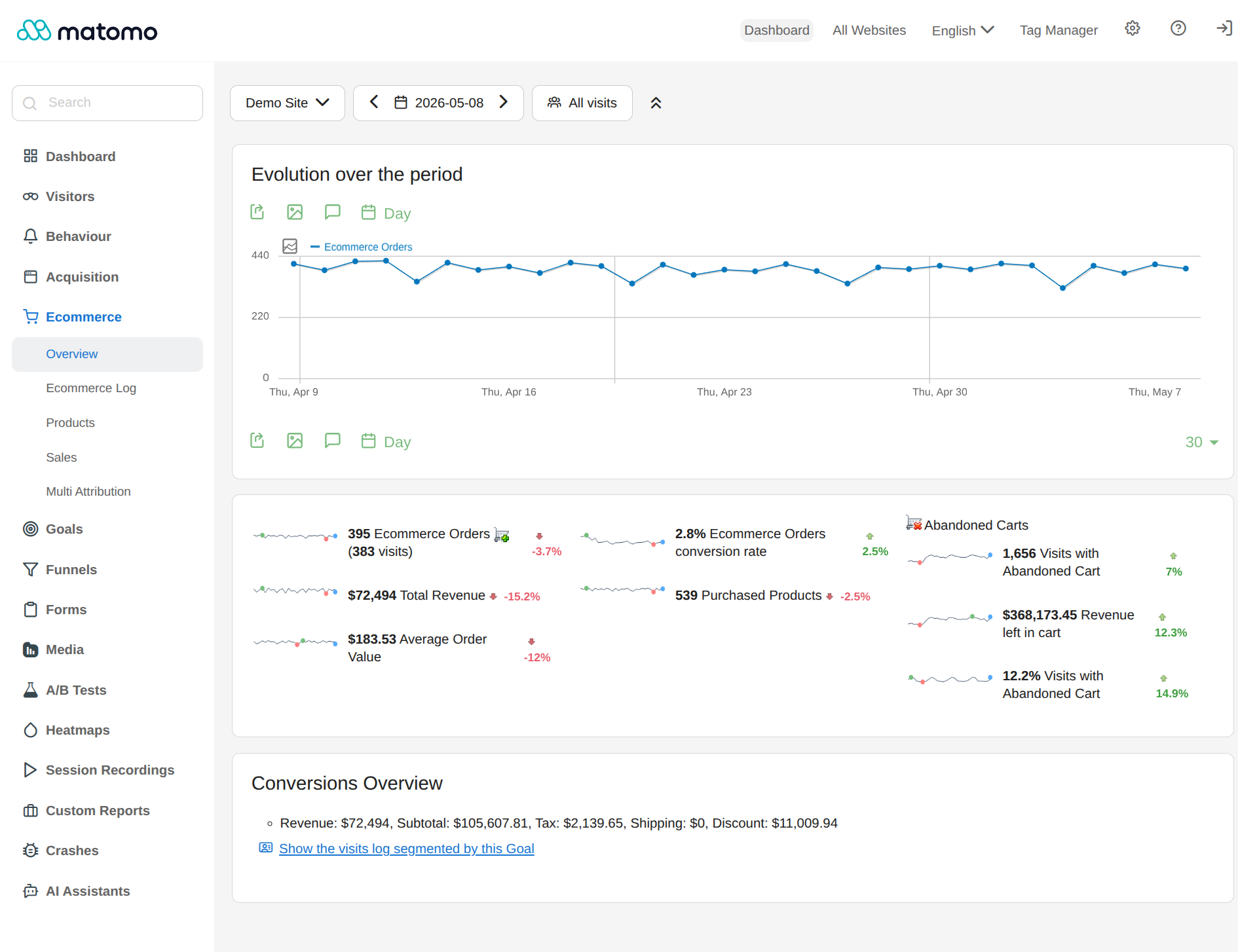
Ecommerce analytics is included in the free WordPress plugin without any additional purchase. The plugin supports WooCommerce, Easy Digital Downloads, and MemberPress out of the box, detecting the active ecommerce plugin on installation and beginning to capture purchase events automatically.
The ecommerce reports I found documented in the plugin include:
- Order count, revenue, and average order value over the selected period.
- Product performance by revenue, units sold, and conversion rate.
- Category performance.
- Shopping cart abandonment data: visits that added to cart but did not complete checkout.
- Order completion rate relative to total visits.
- Ecommerce goals tied to specific conversion events.
What sets this apart from comparable plugins is that the data is stored entirely on your own server. WooCommerce order data never reaches Google’s infrastructure. For stores operating in sectors with heightened data sensitivity, keeping order data local is a meaningful compliance advantage.
For stores needing deeper ecommerce funnel visualization, the WooCommerce Analytics premium add-on provides granular step-by-step funnel analysis at approximately 39 EUR/year. The free ecommerce module covers standard ecommerce metrics; the add-on adds conversion path granularity beyond what the free version tracks.
Campaign and conversion tracking
Matomo tracks UTM campaign parameters automatically. Any URL tagged with utm_source, utm_medium, utm_campaign, utm_content, or utm_term values is correctly attributed in the Acquisition reports. No additional setup is required beyond adding UTM parameters to your links.
Conversion goals are configurable through the free plugin. Goals can be set to trigger on specific pages visited, specific number of pages viewed in a session, specific session duration thresholds, custom events configured via the Matomo Tag Manager or the JavaScript tracking API, and ecommerce orders for WooCommerce and Easy Digital Downloads stores. There is no cap on the number of goals in the free plugin. Each goal can be assigned a monetary value for revenue attribution reporting.
The Matomo Tag Manager is included in the free WordPress plugin and provides a no-code interface for deploying and managing JavaScript tags, pixel snippets, and custom tracking events without editing WordPress theme files or contacting a developer. This capability is directly comparable to Google Tag Manager, deployed from within WordPress without external account dependencies. Note: the Tag Manager does not function in WordPress Multisite configurations. This is documented in the plugin FAQ and remains a current limitation as of version 5.12.1.
Premium add-ons
The Matomo WordPress plugin’s free feature set is substantial. The premium add-ons extend it into capabilities typically associated with separate specialized tools. Each add-on is purchased independently from the Matomo marketplace and installs as an additional plugin that activates through the Matomo dashboard inside WordPress. All prices are in EUR per year, and all add-ons include a 30-day free trial.
- Heatmaps and Session Recording (~219 EUR/year). Visual engagement overlays showing where visitors click, scroll, and hover on any page. Session recordings capture individual visit replays, showing exactly what a visitor did from entry to exit. This replaces a separate Hotjar or Microsoft Clarity subscription for sites where privacy compliance prevents using those SaaS tools.
- Form Analytics (~169 EUR/year). Tracks how visitors interact with forms: field completion rates, field-level drop-off, time spent, and submission versus abandonment. Identifies which form fields lose the most users and where friction exists.
- Funnels (~193 EUR/year). Multi-step funnel visualization showing drop-off at each defined step in a conversion sequence. Can be configured for checkout flows, signup sequences, or any multi-page process.
- Media Analytics (~176 EUR/year). Tracks video and audio engagement: play rates, average watch time, completion percentages, and replay behavior. Covers YouTube, Vimeo, HTML5 video, and audio elements on your WordPress pages.
- A/B Testing (~219 EUR/year). Run controlled split tests on page variations, call-to-action text, or layout elements and measure impact on conversion rate. Results are calculated in the Matomo environment, not sent to external testing platforms.
- Custom Reports (~219 EUR/year). Build custom report views combining dimensions and metrics from across the Matomo data set. Useful for reporting on specific segments or performance questions not covered by standard reports.
- WooCommerce Analytics (~39 EUR/year). Extends the free ecommerce module with deeper funnel visualization and enhanced product-level attribution. At the lowest price of any add-on in the Matomo marketplace, this is a practical choice for WooCommerce stores that want funnel granularity.
- Cohorts (~94 EUR/year) and Users Flow (~94 EUR/year) cover user retention analysis and navigation path analysis, respectively.
- Activity Log (~33 EUR/year). Maintains audit trails of Matomo user actions for security and compliance purposes.
The à la carte structure means you pay only for what you use, but it also means total costs can accumulate significantly. A site running Heatmaps, Form Analytics, Funnels, and Custom Reports would spend approximately 800 EUR/year before any hosting considerations. For organizations where each of these capabilities has a specific use case, the cost is justified. For sites that only need one or two, the individual add-on model lets you buy exactly what matters.
Performance considerations
Matomo stores analytics data in your WordPress MySQL database. Every pageview generates an additional database write request beyond normal WordPress page load operations. At low to moderate traffic volumes, this overhead is manageable on standard managed WordPress hosting. At high traffic volumes, this becomes a real constraint.
The plugin FAQ is direct about this: Matomo for WordPress is not recommended for sites with “substantial traffic.” The recommended path for high-traffic sites is either the standalone Matomo On-Premise installation (which uses a separate database and server, outside of WordPress) or Matomo Cloud (the managed SaaS offering). Both remove the database write overhead from your WordPress hosting environment.
Database table size is the other long-term consideration. Matomo stores raw visitor logs at the individual event level. Over months or years on an active site, these tables can grow significantly. Matomo includes data retention configuration (the option to automatically purge raw logs older than a defined period) specifically to manage this. Setting a data retention policy on activation, rather than after table growth becomes a problem, is the right approach.
On-Premise vs Cloud
Standalone On-Premise. The community (open-source, free) version of Matomo can be installed on a separate web server or VPS outside of WordPress. This removes the WordPress plugin’s database constraint: Matomo runs independently with its own MySQL database, its own PHP process, and its own web server configuration. WordPress is then connected to this Matomo instance using the “Connect Matomo” WordPress plugin rather than the full self-hosted WordPress plugin. This is the correct path for high-traffic sites that want full self-hosted control without the WordPress plugin’s resource limitations.
Matomo Cloud. The managed SaaS version. Matomo hosts and maintains the analytics infrastructure; you connect your WordPress site using the Connect Matomo plugin. The Starter plan is $29/month for 50,000 monthly page hits, with a 21-day free trial and no credit card required. Business and Enterprise tiers cover higher hit volumes and require a sales conversation. Matomo Cloud includes automatic updates, daily backups, managed infrastructure, and the complete Matomo feature set. For site owners who want Matomo’s privacy-first feature set without managing server infrastructure, Cloud is the correct path.
The choice between the WordPress plugin, standalone On-Premise, and Cloud comes down to traffic volume and technical capacity. Low-to-moderate traffic with a technically comfortable site owner is the WordPress plugin’s natural space. High traffic or multi-site operations with DevOps capacity favor standalone On-Premise. Minimal maintenance preference with budget for a recurring subscription favors Matomo Cloud at $29/month for Starter.
Pricing and license value
The WordPress plugin is free and always has been. All core analytics features, including visitor tracking, ecommerce reporting, campaign tracking, goals, Tag Manager, segmentation, geographic data, user management, and GDPR tools, are included at no cost. All prices verified August 21, 2026.
Premium add-ons are sold through the Matomo marketplace at individual prices in EUR with annual billing and a 30-day free trial for each add-on. Selected verified prices: Heatmaps and Session Recording approximately 219 EUR/year; Form Analytics approximately 169 EUR/year; Funnels approximately 193 EUR/year; Media Analytics approximately 176 EUR/year; A/B Testing approximately 219 EUR/year; Custom Reports approximately 219 EUR/year; WooCommerce Analytics approximately 39 EUR/year; Cohorts approximately 94 EUR/year; Users Flow approximately 94 EUR/year; Activity Log approximately 33 EUR/year.
Matomo Cloud Starter is $29/month (approximately $290/year with 2-month annual discount) for 50,000 monthly hits, up to 30 users, and email support. Higher hit volumes require Business or Enterprise pricing through the sales team.
Compared with privacy-first self-hosted alternatives: Burst Statistics Business costs $99/year for one site with a simpler feature set and no heatmaps. WP Statistics Premium starts at $119/year with comparable core analytics but no heatmaps, session recording, or A/B testing. Matomo is the only self-hosted option in the WordPress category that brings these advanced capabilities to the platform at any price.
Compared with SaaS privacy alternatives: Plausible Analytics starts at $9/month and Fathom Analytics starts at $15/month. Both are cleaner managed experiences but store data externally (on their servers, not yours), which may not satisfy strict data sovereignty requirements. Matomo is the strongest option when full on-premises data ownership is the requirement.
Pros and cons
Pros
- The most complete feature set in the self-hosted WordPress analytics category. No competing plugin offers heatmaps, session recordings, A/B testing, form analytics, conversion funnels, media analytics, and custom reporting from a single self-hosted platform.
- 100% data ownership and privacy-first architecture. All visitor data is stored in your WordPress database. Nothing is sent to Google, Matomo, or any third party by default. Satisfies Schrems II, GDPR Article 44, and strict data sovereignty requirements that GA4 connector plugins cannot meet.
- Comprehensive ecommerce tracking in the free plugin. WooCommerce, Easy Digital Downloads, and MemberPress are supported without any add-on purchase, with full revenue, product, and conversion data stored locally.
- No goal or segment cap. Goals, custom segments, and custom reports are unlimited, compared to Burst Statistics’ 3-goal free tier cap.
- Full geolocation data in the free version. Matomo downloads a geolocation database on activation and provides country, region, and city data without any paid plan requirement or API key.
- Google Analytics import included. Historical GA4 data can be migrated into Matomo, preserving continuity for sites switching from GA4.
- Tag Manager included free. Allows non-technical deployment of custom JavaScript tags, pixels, and events without editing theme files.
- ISO 27001:2022 certified. The Matomo platform and company development practices are independently certified, a security assurance not available from any competing self-hosted WordPress analytics plugin.
- Open-source foundation. The core Matomo platform is fully auditable, meaningful for organizations that require code transparency as part of their security review process.
- 30-day free trial for every premium add-on. Risk-free evaluation before committing to an add-on subscription.
- 1 million organizations worldwide, 4.6/5 from 177 WordPress reviews, 4.7/5 average across major software review platforms.
Cons
- Highest server resource requirements in the self-hosted WordPress analytics category. PHP 7.2+ minimum, 128MB memory minimum (256MB recommended). Sites on shared hosting with limited memory may experience activation issues or performance degradation.
- Not recommended for high-traffic sites. The plugin FAQ explicitly states that substantial traffic sites should use standalone On-Premise or Matomo Cloud instead.
- Steeper configuration and maintenance curve than any competing plugin. Matomo is closer to configuring a self-hosted application than activating a simple WordPress plugin. Non-technical site owners will spend more time in setup than Burst Statistics or WP Statistics require.
- Premium add-on costs accumulate quickly. Organizations that need heatmaps, form analytics, funnels, and A/B testing simultaneously face costs of approximately 600-800 EUR/year or more before Matomo Cloud is considered.
- Tag Manager does not work in WordPress Multisite. A documented limitation as of version 5.12.1 with no stated resolution timeline.
- No AI analytics features. MonsterInsights Charlie Chat allows natural language analytics queries. Matomo has no equivalent AI-powered query or insight feature, a growing gap as GA4 connector plugins invest in AI capabilities.
- Database growth requires monitoring. Raw visitor logs accumulate in your WordPress database over time. Without setting a data retention policy, tables can grow to sizes that affect database performance.
- Interface complexity may overwhelm non-technical users. The full Matomo application rendered inside WordPress is powerful but dense.
- 100,000 active installs, while solid, is below Burst Statistics (200,000+) and significantly below WP Statistics (600,000+) among self-hosted plugins. The support community is narrower than the widest-install competitors.
Alternatives to Matomo Analytics
- Burst Statistics. A privacy-first, self-hosted WordPress analytics plugin built by Team Updraft. Cookieless tracking, 100% local data storage, and a far simpler interface than Matomo. The free version covers unlimited pageviews, 3 custom goals, real-time counts, and engagement tracking. Pro plans add geographic data, UTM tracking, and WooCommerce revenue at $49-199/year. The right choice for site owners who want privacy-first analytics without the Matomo configuration overhead. See our Burst Statistics review for a full breakdown.
- WP Statistics. The most-installed self-hosted WordPress analytics plugin at 600,000+ active installs. Geographic data and unlimited goals included in the free tier. Premium at $119/year for a single site covers UTM tracking, scheduled reporting, and Search Console integration. Interface is more complex than Burst Statistics but less complex than Matomo. See our WP Statistics review for a full comparison.
- Slimstat Analytics. Self-hosted analytics with a defining feature: an individual per-session access log showing each visitor’s full page sequence, referrer, browser, and resolution in real time. Sixteen years of active development. Free with a $29/year Pro tier adding heatmaps, email digests, and goals. See our Slimstat Analytics review for a full breakdown.
- MonsterInsights. The most-installed WordPress GA4 connector at 2 million active installs. Sends data to Google Analytics 4. Includes AI analytics (Charlie Chat), the broadest integration list in the category, and WooCommerce ecommerce tracking at the Pro level. The right choice when GA4 is the organizational analytics standard. See our MonsterInsights review for a full breakdown.
- Analytify. A WordPress GA4 connector competing with MonsterInsights on price. StartUp at $99/year for 2 sites includes WooCommerce ecommerce tracking and LMS tracking. Like MonsterInsights, requires a Google account. See our Analytify review for a full comparison.
- Plausible Analytics. A SaaS privacy-first analytics service that embeds via a tracking code. Stores data on Plausible’s servers (EU-based option available). Starts at $9/month. Simpler than Matomo, no self-hosted maintenance required, but data is on Plausible’s infrastructure rather than yours.
- Site Kit by Google. The official free Google plugin connecting WordPress to GA4, Search Console, PageSpeed Insights, and AdSense. Zero cost, no dashboard to maintain. The opposite of Matomo’s privacy positioning: all data flows to Google. See our Site Kit by Google review.
Final verdict
Matomo Analytics is the most complete self-hosted analytics platform available as a WordPress plugin. After sixteen-plus years of development, backed by a commercial company with ISO 27001:2022 certification and a million-organization user base, it delivers a feature set that simpler alternatives cannot match: full ecommerce tracking free, Tag Manager free, unlimited goals free, geolocation free, and an add-on marketplace that brings heatmaps, session recordings, A/B testing, and conversion funnels into the same privacy-first environment.
The free WordPress plugin is a serious analytics tool, not a trial version. For the right site owner, specifically one running a WooCommerce store with GDPR compliance requirements, or a technical user who wants full data ownership with no Google dependency, the free plugin is a complete and defensible long-term analytics setup.
The honest trade-offs cannot be minimized. Matomo is not the simplest option in this category. The interface is dense, the resource requirements are higher than any competitor, the database growth needs proactive management, and the premium add-on costs accumulate quickly once heatmaps and funnels enter the picture. For a blogger who wants to know which posts are popular, Burst Statistics free answers that question in two minutes with none of the configuration overhead.
But Matomo’s trade-offs are the price of its ambitions. It is not trying to be a simple traffic counter. It is trying to be a full enterprise analytics stack that organizations can operate on their own infrastructure with complete control over their data. In that goal, it succeeds more completely than any competing WordPress plugin.
For any WordPress site owner whose analytics requirements have bumped against the ceiling of simpler self-hosted tools, and especially for those where data sovereignty is a real requirement rather than a preference, Matomo Analytics is the answer at the top of the category.