


One million downloads. A GPL license. A one-time Pro price that has not changed in years. On paper, s2Member looks like one of the strongest deals in the WordPress membership plugin space. After spending time digging into its feature set, testing the free framework, and working through the documentation, the reality is more nuanced.
s2Member is a capable free WordPress membership plugin for protecting content and collecting simple payments. It also carries real limitations and a smaller active user base than most competing options. This review covers what actually works, what does not, and who should choose it over the alternatives in 2026.
Note on testing basis: s2Member’s free framework was inspected through its WordPress.org plugin listing, the official feature and documentation pages at s2member.com, and the plugin changelog through August 2026. Direct admin panel functionality was checked via the plugin’s settings descriptions, screenshot documentation, and the s2member.com knowledge base. The Pro version was not purchased for this review; Pro-only features are described from official documentation and are noted as such throughout.
At a glance
Tested on: WordPress.org plugin listing, official feature and documentation pages at s2member.com, plugin changelog, and support forum (version 260814, August 14, 2026).
Free version: Yes. The s2Member Framework is published on WordPress.org with no credit card required and no time limit.
Active installs: 8,000+ with a 4.1-star rating across 234 reviews on WordPress.org.
Bottom line: A capable free membership framework for technically comfortable WordPress users. One-time Pro pricing with no renewal fees is a genuine differentiator. The small install base and steep learning curve are real drawbacks to weigh honestly.
Quick verdict
s2Member’s free tier is genuinely useful for simple membership sites: four membership levels, PayPal Standard and ClickBank integration, file download restrictions, and shortcode-based content protection. The Pro version adds Stripe, on-site checkout, and content dripping for a one-time payment with no renewal fees, which is a meaningful differentiator against subscription-priced competitors.
Quick verdict card
Best for: Developers and technically comfortable site owners who want a free or low-cost, no-recurring-fee membership solution and are willing to learn a shortcode-based workflow.
Best plan for most small sites: The free framework for PayPal-only sites with up to four membership levels; Pro Single Site ($89 one-time) if you need Stripe or on-site checkout.
Best plan for agencies or multi-site operators: Pro Unlimited Sites ($189 one-time) covering any number of domains or Multisite networks.
Standout: One-time Pro pricing with lifetime access to updates, no recurring license fees, and a genuinely capable free tier.
Watch out for: Low active install count, steep learning curve, community-only support, and ongoing security patches requiring attentive version management.
What s2Member is
s2Member is a self-hosted WordPress membership plugin that has been available since the early days of WordPress membership tooling. It protects content, manages member registrations, and handles recurring payments through multiple gateways. The core plugin installs from the WordPress plugin directory and runs entirely on your server.
The plugin is built around a roles-and-capabilities model that extends the standard WordPress user system. When a visitor registers or purchases access, s2Member assigns them a membership level (Level 1 through Level 4 on the free framework, unlimited with Pro). That level determines which posts, pages, categories, file downloads, or URI patterns they can access.
Access logic is applied in two ways: through admin meta boxes in the page or post editor, and through shortcodes embedded in content. The [s2If /] shortcode, for example, lets you show different content blocks to members versus guests within the same page, without creating two separate pages.
The plugin is GPL-licensed and the source code is publicly available on WordPress.org and GitHub. The developer behind s2Member is Cristián Lávaque, who took over development from the original creator Jason Caldwell and has been maintaining it actively through 2026.
As of August 2026, s2Member has 8,000-plus active installations on WordPress.org and a 4.1-star rating across 234 reviews. That install count is low compared to the market leaders in this category, which run into the tens or hundreds of thousands of sites. It is worth understanding why before choosing it for a project.
Who s2Member is best for
Strong fit
- Developers and technically experienced WordPress users who are comfortable with shortcodes and custom configuration.
- Small membership sites on a budget where PayPal Standard or ClickBank payment buttons are sufficient, and the site has four or fewer access tiers.
- Site owners who want Pro features but resist recurring SaaS-style licensing fees. The one-time payment model is genuinely unusual in this category.
- Sites with Amazon S3 or CloudFront hosted media that need protected streaming and download links.
- BuddyPress and bbPress-based community sites that need membership-gated forum access.
- Agencies that manage multiple client membership sites and want to cover them all under a $189 unlimited license.
Weak fit
- Beginners or non-technical site owners who expect a guided setup wizard and a visual interface. s2Member’s configuration is menu-heavy and shortcode-driven.
- Sites that need modern payment experiences like Stripe Checkout or Link, Apple Pay, or Google Pay out of the box. The Pro Stripe integration uses Pro-Forms, a custom form system that works but is not the same as Stripe’s modern embedded UI.
- Teams that expect dedicated premium support. s2Member offers community forums and documentation only. There is no paid support tier.
- Sites running with high user volume or WooCommerce stores that need deep product-membership integration. s2Member does not integrate natively with WooCommerce orders.
- Site owners who want a large active community, official add-on ecosystem, and third-party tutorial library. With 8,000-plus installs, s2Member’s community is small by comparison.
Installing and setting up s2Member
s2Member installs from the WordPress plugin directory. Search for “s2member” in Plugins > Add New, install, and activate. After activation, a new “s2Member” top-level menu appears in the WordPress admin sidebar.
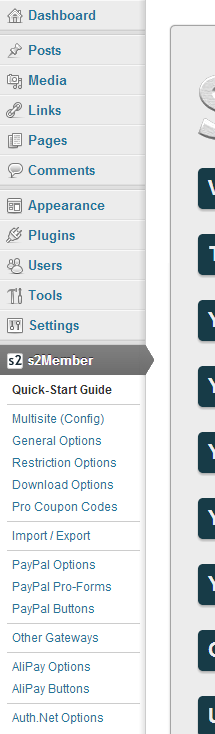
The first configuration screen presents a security key setup prompt. s2Member requires a unique encryption key specific to your installation. You generate or enter one, save it, and the plugin stores it for encrypting sensitive data. This is a good security practice, but it is also an immediate signal that s2Member expects users to read the documentation rather than click through defaults.
The admin panel is organized into several sub-menus:
- General Options: Global configuration including the security key, membership options page, login welcome page, login and registration styling, and open registration settings.
- Restriction Options: Site-wide and URI-based access controls.
- PayPal Options: PayPal Standard and PayPal Pro (Pro version) gateway configuration.
- Stripe Options (Pro): Stripe API keys, webhook endpoint, and Pro-Form behavior.
- Authorize.Net Options (Pro): Gateway credentials and form settings.
- ClickBank Options: ClickBank gateway setup.
- Member Options: Import/export tools, user management filters, IP restriction settings.
- API / Scripting: Event-driven API notifications and remote operations endpoint (Pro).
The number of settings panels is substantial. There is no guided wizard for first-time setup. If you are configuring PayPal Standard payments, the process involves entering API credentials in the PayPal Options panel, generating a payment button via the built-in button generator, copying the shortcode output into a page or widget, and testing the IPN (Instant Payment Notification) URL in your PayPal account. Each step is documented in the knowledge base, but none of it is self-explanatory from the admin UI alone.
Content protection is applied per-post and per-page through a meta box that appears below the standard WordPress editor. You select the minimum membership level required to view that content, or enable URI-level restrictions for entire sections of your site. This part of the workflow is intuitive once you know it is there.
For the free framework, the setup flow takes approximately one to two hours of reading documentation and configuring settings for a basic two-level membership site with PayPal Standard checkout. That is longer than what competing modern membership plugins require, but the configuration depth is also higher than most free alternatives offer.
Content protection and access control
Content protection is the core of s2Member, and it works reliably across WordPress content types.
What the free version protects:
- Individual posts and pages (via the membership level meta box in the editor).
- Entire categories and tags.
- URI patterns (restrict access to any URL path, including custom post type archives or plugin pages).
- File downloads (local server files or Amazon S3/CloudFront objects) restricted by membership level.
- Feeds, search results, and archive views.
- bbPress forums and BuddyPress profile content.
The [s2If /] shortcode is one of the most flexible tools in s2Member’s kit. You can display entirely different content blocks within the same page depending on the user’s membership level, login status, or custom capabilities. A common use case: showing a brief teaser to guests and the full article to Level 1 members, on the same post, without any plugin add-on. This works in the free framework.
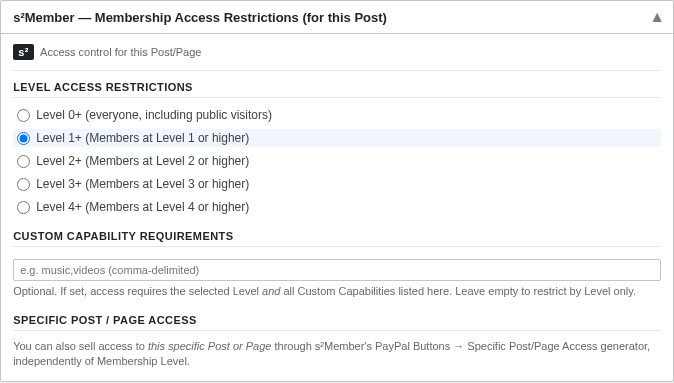
Custom Capabilities (CCAPS) allow you to grant access to specific content that is not tied to a membership level. You can sell an individual post or a file download to a user without requiring a full membership upgrade. This is useful for one-off digital product sales alongside a subscription business.
The free framework supports up to four membership levels. Levels are incremental: Level 2 members automatically inherit Level 1 access. Level 3 inherits Level 1 and Level 2. This hierarchy simplifies configuration but limits flexibility if you want non-hierarchical membership structures.
Payment gateways and checkout
This is where the free framework and Pro version diverge most sharply.
Free framework: PayPal Standard and ClickBank
The free version generates PayPal Standard hosted payment buttons and ClickBank buttons via a built-in generator in the admin panel. When a user clicks the button, they leave your site to complete checkout on PayPal’s or ClickBank’s hosted pages. After successful payment, PayPal fires an Instant Payment Notification (IPN) back to your site, and s2Member creates the member account automatically.
The hosted checkout flow is functional and secure. The limitation is conversion: sending users off-site to complete payment increases abandonment rates compared to an on-site checkout form.
The free version supports one-time “Buy Now” payments, recurring subscriptions with daily through yearly billing intervals, free and paid trial periods, fixed billing cycle termination, and independent custom capability sales to existing members.
Pro version: Stripe, PayPal Pro, Authorize.Net, and Pro-Forms
The Pro version introduces Pro-Forms, which are on-site checkout forms that handle registration and payment in a single step without redirecting the user. Pro-Forms are available for Stripe, PayPal Pro, and Authorize.Net.
Stripe Pro integration (documented for 18-plus countries) connects via API keys and webhook. The Pro-Form collects name, email, password, and card details on your site. Google reCAPTCHA is included in Pro-Forms as an anti-spam measure for free registration forms.
PayPal Pro (available in the US, UK, and Canada) handles on-site credit card processing through PayPal’s Advanced Integration Method. Authorize.Net Pro integration is available in five-plus countries and requires a formal Authorize.Net account with a monthly gateway fee, separate from the s2Member Pro cost.
Pro-Form types across all three gateways include: free registration, registration and checkout, billing modification, custom capability sale, billing information update, cancellation, and individual post or page sale.
Content dripping (Pro only)
Content dripping is a Pro-exclusive feature using the [s2Drip /] shortcode. It allows you to schedule content release based on how long a user has been a member. For example: a course site might unlock Module 1 immediately, Module 2 after seven days, Module 3 after fourteen days. The drip logic is set per-content block via shortcode attributes rather than a visual calendar.
The drip system does not include a visual drip schedule builder or a dedicated LMS-style course structure. If you need a visual course builder with video hosting, progress tracking, and quizzes, s2Member is not the right tool. Dedicated LMS plugins like LearnDash handle those needs better.
Security features
s2Member includes several security features in both free and Pro versions:
- Brute-force login protection: After repeated failed login attempts from the same IP address, s2Member temporarily bans that IP. The threshold and ban duration are configurable.
- Unique IP restrictions: Limit simultaneous active connections per username to prevent credential sharing.
- Security encryption key: All sensitive data s2Member stores is encrypted using a key unique to your installation.
- Simultaneous login monitoring: Configurable limit on how many browser sessions a single member can have active at the same time.
On security vulnerabilities: the support forum surfaced a Remote Code Execution vulnerability in s2Member Pro version 241114 and earlier, disclosed and patched in late 2024. The 2026 changelog shows ongoing security hardening across multiple releases, including stricter input validation for shortcodes (v260814, August 2026), improved JavaScript injection protection in stream shortcodes (v260805), and safer handling of serialized data in webhook processing (v260325).
The current WordPress.org listing version (260814, released August 14, 2026) includes the most recent security improvements. Running an outdated version of s2Member carries meaningful risk. Anyone using s2Member should maintain the latest version diligently.
File downloads and media streaming
s2Member includes file download protection in both free and Pro versions, with streaming media support added in Pro.
Free: protected file downloads. You can host files on your server and restrict access by membership level using the [s2File /] shortcode. The shortcode generates a signed URL that grants access to the file based on the user’s membership level. Files are served through WordPress rather than directly from the file system, which prevents direct URL access. Download keys are available for single-use download links that bypass the normal membership check.
Pro: Amazon S3 and CloudFront streaming. Pro adds protected audio and video streaming via Amazon S3 and CloudFront. The [s2Stream /] shortcode generates signed CloudFront URLs that expire after a set time, so videos cannot be hotlinked or saved from direct URL access. RTMP streaming (for seekable, non-downloadable playback) is supported alongside MP4 fallback for mobile devices. JW Player integration is included for the video player layer. This is a notably powerful feature for e-learning or course sites that self-host video on S3 and need to ensure members cannot download or share raw video links.
Email marketing integrations
s2Member includes built-in integration with MailChimp and AWeber in the free framework. Members are automatically subscribed to your mailing list when they register, and list subscriptions are updated when profiles change. GetResponse integration is Pro-only.
Affiliate platform integrations (iDevAffiliate and ShareASale) are Pro-only, including the ability to tie coupon codes to specific affiliate accounts.
The plugin does not include native integration with ActiveCampaign, ConvertKit, Drip, or most modern email marketing platforms beyond MailChimp and AWeber. Connecting to other platforms requires custom API scripting using s2Member’s event notification system (Pro) or third-party automation tools like Zapier.
Pricing and license value
s2Member’s pricing model is one of its most distinctive characteristics in the membership plugin market.
| Plan | Price | Billing | Sites |
|---|---|---|---|
| Framework (Free) | $0 | No card required | Unlimited |
| Pro Single Site | $89 | One-time | 1 live site |
| Pro Unlimited Sites | $189 | One-time | Unlimited domains and Multisite |
The Pro price is a one-time purchase. There are no annual renewals, no subscription fees, and no per-site charges beyond the two license tiers above. The purchase includes lifetime access to future s2Member Pro versions and source code.
That pricing model is genuinely rare. MemberPress starts at $199.50 per year on the Launch plan. Paid Memberships Pro‘s Standard paid plan is $49 per month. Comparable full-featured membership plugins with Stripe support typically require annual renewals. s2Member Pro at $89 or $189 with no renewals is a dramatically lower total cost of ownership over three to five years.
The tradeoff: you get no premium support tier at any price. Support is community-only via the s2Member forum and the knowledge base. If something breaks and you need expert help, you are on your own or hiring a developer independently.
Money-back guarantee: A 14-day refund policy applies to Pro purchases. Refunds are granted at the developer’s discretion and only if issues persist after troubleshooting in a clean WordPress installation. After 14 days, no refunds are available.
Pricing verdict: For budget-conscious developers managing multiple membership sites, the $189 unlimited license is exceptional value. For buyers who need hand-holding support, this pricing model does not include it.
Pros and cons
Pros
- Genuinely capable free framework with PayPal Standard, up to four membership levels, content protection, file downloads, and shortcode conditionals at no cost.
- One-time Pro pricing ($89 single site, $189 unlimited) with no renewal fees and lifetime access to future versions.
- Unlimited site license at $189 covers agencies managing multiple membership sites.
- Highly flexible shortcode-based system with over 1,000 WordPress hooks and filters for developer customization.
- Stripe, PayPal Pro, and Authorize.Net support in Pro via on-site Pro-Forms.
- Protected Amazon S3 and CloudFront audio/video streaming in Pro.
- Content dripping via shortcode for course or sequential content delivery (Pro).
- Coupon codes, gift/redemption codes, and virtual terminal transactions (Pro).
- BuddyPress and bbPress integration included.
- Actively maintained with frequent 2026 releases including security patches.
- GPL-licensed with publicly available source code.
- ClickBank integration in both free and Pro versions.
Cons
- Only 8,000-plus active installations, significantly lower than category leaders. Smaller community means fewer third-party tutorials, add-ons, and integration resources.
- Steep learning curve with no setup wizard. Configuration requires reading documentation and working with shortcodes throughout.
- No premium support tier at any price point. Community forum and knowledge base only.
- Security vulnerabilities found and patched across multiple 2026 releases, including a Remote Code Execution issue in Pro 241114 (now fixed). Attentive version management is required.
- Free version limits membership levels to four. Unlimited levels require Pro.
- Pro-Forms for Stripe and PayPal use a custom form implementation, not Stripe’s modern embedded UI or Apple Pay/Google Pay out of the box.
- No native WooCommerce integration.
- Limited native email marketing integrations; ActiveCampaign, ConvertKit, and other modern platforms require custom work.
- No visual content drip scheduler. Drip rules are managed via shortcodes.
- No dedicated LMS features, certificates, or quiz engine.
- PayPal’s platform changes have created recurring compatibility issues requiring ongoing maintenance.
Alternatives to s2Member
MemberPress. A premium-only membership plugin starting at $199.50 per year. The Growth plan ($349.50 per year) adds multiple payment gateways, content dripping, community features, and a gradebook. MemberPress has a large active user base, extensive documentation, and dedicated support. Choose it if you want a polished guided setup, a broader add-on ecosystem, and do not mind an annual recurring cost.
Paid Memberships Pro. Offers a free plugin tier with 25 free add-ons and Stripe and PayPal included at no cost. Paid tiers start at $49 per month and include all 54 premium add-ons plus technical support. Choose it if you want a free foundation with optional paid add-ons and are willing to pay monthly for support access.
Ultimate Member. A free membership plugin focused on front-end user profiles, registration, and login forms with a more modern interface than s2Member. The free version covers basic user management; paid extensions add WooCommerce integration, subscriptions, and other capabilities. Choose it if front-end profile management and community features are the primary goal.
Restrict Content Pro. A straightforward content restriction and subscription plugin with Stripe and PayPal support. Choose it if you want a simpler, less feature-heavy tool than s2Member with a clean interface and dedicated support.
WooCommerce Memberships. A premium WooCommerce extension for sites where membership access is tied to product purchases or subscriptions. Choose it if your membership site is already built on WooCommerce and you want native product-membership integration.
Final verdict
s2Member earns its place as a legitimate free WordPress membership plugin in 2026. The framework is not a demo or a locked-down teaser. It protects content, handles PayPal Standard payments, restricts file downloads, and supports up to four membership levels, all at no cost. For a simple membership site with a developer behind it, that is a usable foundation.
The Pro version’s pricing is the most compelling argument for choosing s2Member over the alternatives. Eighty-nine dollars once, with no renewal, lifetime access to updates, and Stripe and on-site checkout included is a lower total cost of ownership than any competing annual subscription plugin over a two- to three-year window. For agencies covering multiple sites, the $189 unlimited license is difficult to argue with on price alone.
The honest drawback is that s2Member shows its age. The interface is dense and documentation-heavy. The shortcode-centric workflow that was normal in 2012 feels dated compared to block-based and drag-and-drop membership builders available today. The 8,000-plus active install count tells a real story: for every site running s2Member, there are far more running its better-known competitors. Smaller communities mean fewer resources when you hit a problem.
The security history is also worth taking seriously. Multiple patches across 2026 point to active security maintenance, which is good, but the RCE vulnerability found in late 2024 and the ongoing hardening work suggest that anyone running s2Member must treat version updates as non-optional maintenance.
My final read: s2Member is a smart choice for technically capable developers who want a no-recurring-fee membership solution and are comfortable doing the configuration work themselves. It is not the right choice for beginners, for teams who need support, or for buyers who want a modern visual workflow. Know those limits going in, and s2Member delivers real value for its price.